What is mobile app development in this context?
A mobile app is a program you install on your phone, like a habit tracker or a music player. It runs faster and feels smoother than a website because it is built for your phone’s system. Unlike a website or a no-code tool, a custom app does things no off-the-shelf product can. Like working without internet or using your phone’s camera and location in a specific way.
Development here means writing code in Flutter, Google's free toolkit for building apps that work on both Android and iOS from one codebase. It is not using drag-and-drop tools or templates. Instead, it is crafting a unique app that fits your exact needs, like how Loopin works offline and syncs habits later.
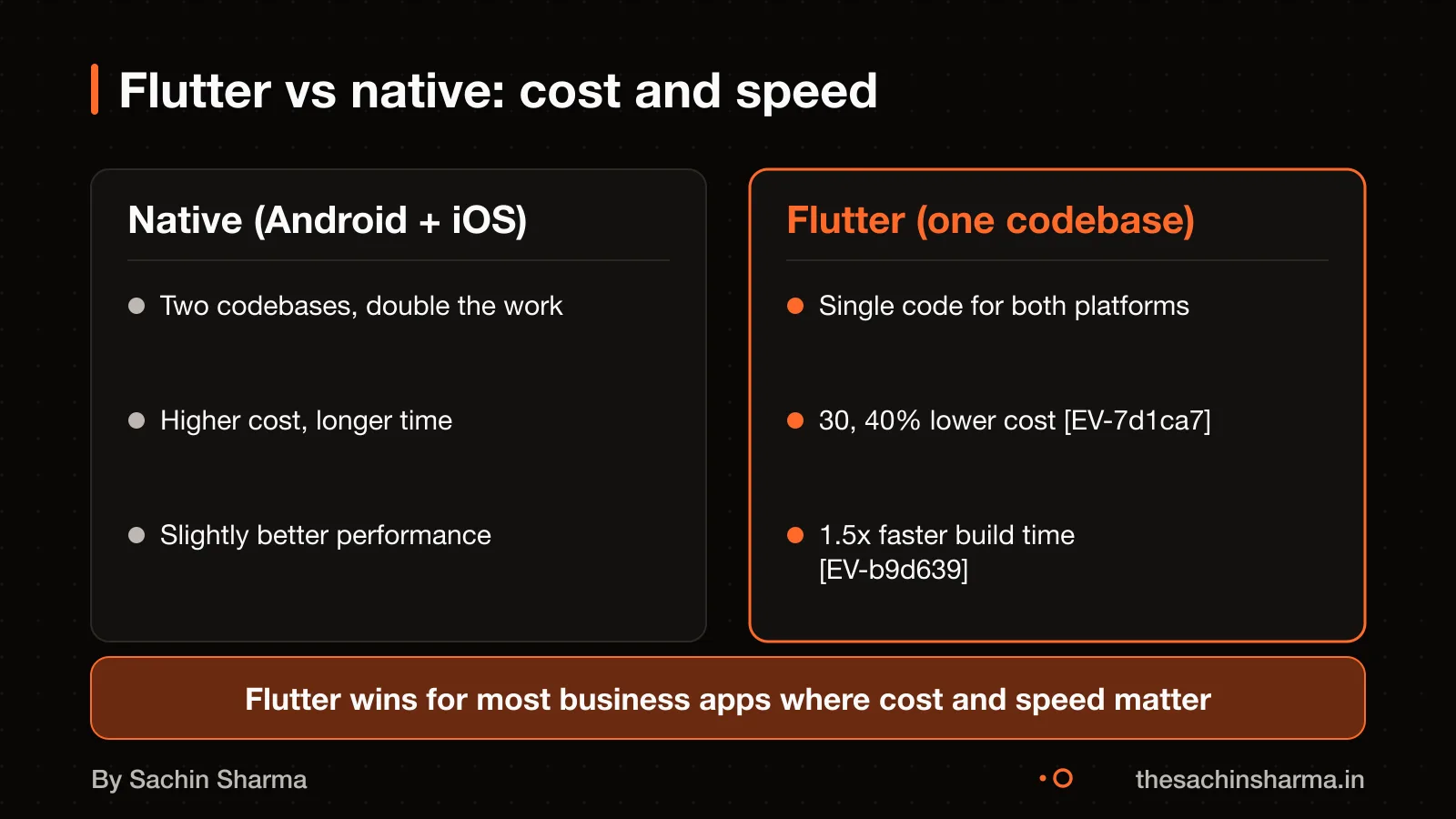
This is different from native development, where apps are built separately for each platform using platform-specific tools. Flutter avoids that split, saving time and cost while still giving a native-like experience.
App or website first?
What does a Flutter app cost in India, and what changes the price?
A Flutter app in India costs from ₹4 lakh for a basic MVP to ₹1.25 crore for a complex enterprise app as of 2026. Most business apps fall between ₹25 lakh and ₹65 lakh. This range depends on features, design, and integrations. A simple app with login, a dashboard, and basic data entry starts at the lower end. Larger systems with user roles, admin panels, and live data cost more.
Adding payments raises the cost by ₹1.6 to 4 lakh. This covers secure checkout, refund flows, and GST-compliant receipts. Custom design with branded animations using Rive or Lottie adds ₹4 to 16 lakh, based on screen count. More screens mean higher cost. You may skip this if you use standard Flutter widgets.
Quotes vary because some firms include design, testing, and deployment, while others quote for coding only. Some charge by the hour, others by the milestone. Hidden costs appear when apps need third-party API access, complex sync, or compliance work. I include all core features in one price. You own the code from day one.
For a precise number, share your app idea in one line. I will reply with what drives the cost and what you can cut.
Want a number for your idea? Send one line on WhatsApp. I reply with what drives the cost and what to cut.
Message me on WhatsAppHow long does it take to build a mobile app?
An MVP app with 3 to 10 screens takes 4 to 8 weeks to develop. A standard business app with 15 to 30 screens takes 8 to 16 weeks. A feature-rich app with 30 to 60 screens takes 16 to 28 weeks. These times are for development only and do not include planning, design finalisation, or app store approval. Store review adds 1 to 3 weeks, depending on platform and revisions.
The number of screens, complexity of features, backend integrations, and whether offline support is needed affect the timeline. Apps like Loopin or MojoCinema, which sync data or cache media locally, take longer than basic apps. Team size and client feedback speed also play a role. Delays often come from late changes or unclear requirements.
As of 2026-07-02, these ranges reflect development timelines for Flutter apps. I use milestone-based delivery, so you get working builds early, even in long projects. This helps catch issues before they add delay.
Why Flutter over native Android or iOS development?
Flutter cuts your cost by 30 to 40% and speeds up delivery by 1.5 times compared to building two separate native apps. This saving comes from writing one codebase for both platforms instead of two. You test once, fix once, and release to Android and iOS at the same time. Flutter achieves this with Dart, a fast language, and a unified framework that renders its own widgets. As for performance, Flutter uses Impeller, its default rendering engine, which works with Metal on iOS. Vulkan on Android to deliver smooth 60 FPS animations. Most users cannot tell a Flutter app from a native one. For apps that do not need platform-specific features, Flutter gives you native-like speed with fewer developers and less time.
If you are choosing how to hire, see Freelancer or agency for a first app? to understand the trade-offs.
When is Flutter not the right choice?
Flutter is not the best choice for high-performance gaming, complex animations or apps that do heavy computation like video rendering or real-time physics simulations. These tasks need direct access to hardware and ultra-low response times, which native Android or iOS code handles better. Native apps are fine-tuned for their platform, so they can use the latest features and perform slightly faster than cross-platform apps. If your app depends on platform-specific controls, deep system integration or modern AR tools, native development may give you more control and stability. For most business apps, internal tools or consumer apps with standard interfaces, Flutter works well. But for niche uses that push the phone’s limits, native is the safer path.
How do you decide if an app should be offline-first?
An app should be offline-first if your users work in poor or no network areas. Like delivery staff in remote zones or field workers in factories. It must show local data right away, not wait for a network response. This is key when real-time sync is not urgent but uptime is.
You test the need by mapping where and how users interact with the app. If they open it during commutes, in basements, or on the move, offline mode adds real value. For example, Loopin is an offline-first habit tracker.
The trade-off is extra cost and complexity. Offline support needs local storage, conflict resolution, and sync logic, which raises development time and testing effort. As of now, I do not publish my full offline-first checklist. Ask me directly with your user scenario to know if it applies to your case.
How much more does an offline-first app cost?
What are the steps in your mobile app development process?
I break mobile app development into four clear milestones: scope, clickable core, feature complete, and store ready. This keeps your project on track and gives you working builds early.
At the scope milestone, we agree on a written list of features, screens, and technical choices. You get a clear plan and a fixed estimate for the next phase. We use this to avoid surprises later.
At the clickable core milestone, you receive a working app build with key screens and navigation. It runs on your phone via TestFlight or an Android APK. This lets you test the flow early. Flutter’s hot reload allows sub-second reload times on physical devices, emulators, and simulators.
At the feature complete milestone, all agreed features are built and tested. You get a near-final build for real-world use. You can try it with your team and give feedback. Minor changes are included; major ones go into a next phase.
At the store ready milestone, the app meets all App Store and Play Store requirements. I handle the build upload using Xcode or Transporter, set up store listings, and support you through approval.
Changes are expected. Small tweaks during development are included. Big changes, like new features, are scoped separately so your timeline and budget stay clear.
Next step: message me on WhatsApp with what you want to build. No forms, no sales team.
Message me on WhatsApp
Common mistakes in mobile app development and how I avoid them
Frequent technical failures include untested code, poor security practices, and unclear progress tracking. I write unit, widget, and integration tests for every feature to catch bugs early. This ensures each part works before it joins the full app. For example, in MojoPlay, real-time sync and offline playback were tested in isolation first.
To prevent security or compliance issues, I follow India’s cyber incident reporting rules. If the app handles user data, it must report incidents to CERT-In. I design apps like FlashDrop with no network access or data storage, reducing risk by default.
You can verify progress without reading code. I share working builds through App Store Connect, where you test features on your own phone. Tools like documentation and test reports let you check what was built and how it behaves. For instance, Daily’s quiz flow was shared as a live build before final sign-off.
Worked example: cost and time for a habit tracker app
Worked example: cost and time for a habit tracker app
A 10-screen habit tracker app costs ₹4 to 12 lakh and takes 4 to 8 weeks to build. This range covers a basic single-platform MVP with core features like user onboarding, habit logging, streak tracking, and notifications. Offline-first design is included in this estimate as it is standard in my Flutter apps when the app logic demands it. Such as when users need reliable access without network. For example, Loopin, an offline-first habit tracker with Google Drive sync, follows this pattern. The final cost depends on backend complexity, third-party integrations, and design depth. As an estimate, assuming 10 screens and standard features, the lower end of the range applies.
When is custom mobile app development not the right choice?
When is custom mobile app development not the right choice?
- If your need is simple, like sharing updates or taking orders, a website or WhatsApp may be faster and cheaper. A custom app is not worth it when you only need basic communication or information display.
- If you want to test an idea quickly, no-code tools or AI app builders can give you a working prototype in days, not weeks. These are better when you are not sure if customers will use the product.
- If your team does not have time to manage updates or handle user feedback, a custom app may become a burden. You need to plan for ongoing fixes and small improvements after launch.
- If your users do not use their phones for tasks like logging data or tracking progress, an app may not fit their routine. A simple form or spreadsheet might work just as well.
Consider the Lovable alternative: when a developer beats an AI app builder for cases where a lightweight solution wins.
What is in it, and what is not
One codebase for Android and iOS, built offline-first when your users cannot count on a signal, by the person you speak to.
- 01A written scope
Screens, features and integrations listed in plain language, with the things left for version two named.
- 02Design you can react to
Key screens and the main flow drawn before they are built, so you change your mind on paper, not in code.
- 03The app itself
Flutter for Android and iOS, with offline behaviour decided up front rather than patched in later.
- 04Testing builds every milestone
Something real on your phone at the end of each milestone, not a demo at the end.
- 05Store submission
Listings, builds and submission on Google Play and the App Store, under accounts you own.
- 06Handover
Source code in your repository, accounts and keys in your name, and a short document on how it fits together.
How it runs: milestones you can test
- 1Scope and flow
You can test: A written scope and the main user flow, agreed.
- 2Clickable core
You can test: The core journey working on your phone, with placeholder content.
- 3Feature complete
You can test: Every in-scope feature present and testable.
- 4Store ready
You can test: Release builds, listings and submission done; handover started.
Right for you if
- You have a clear user and one problem to solve first.
- You need Android and iOS together and want to keep cost sane.
- You want to talk to the person writing the code.
Look elsewhere if
- You need a large team across many specialisms at once.
- You need a game engine or heavy native hardware work.
- You want a fixed number on a one-line brief with no scope.
How it is priced
Price follows scope, not hours I happen to spend. You get a written scope first, then a price split across the milestones above, with a stated process for changes. A single lump sum on a vague brief is where projects go wrong.
Questions to ask before you sign, with anyone
- Who exactly will write my code?
- What is not included, written down?
- What can I test at the end of each milestone?
- Whose name are the store accounts and repository under?
- What happens if we stop halfway?
Quick answers
Why Flutter?
One codebase produces both Android and iOS apps, which cuts cost and keeps the two in step. It suits most business apps; it is not the answer to every problem.
Can the app work without internet?
Yes, if it is designed for it from the start. Offline behaviour is decided in the scope, because retrofitting it is expensive.
Do I own the code?
Yes. The repository and store accounts are set up in your name from the start.
Questions people ask
01Can the app work without internet?
Yes, the app can work without internet if built as offline-first. This means it shows local data immediately and stays usable in poor or no network areas. For your use case, we decide what data to cache and sync. See Loopin for an example.
02Do I own the source code and app store accounts?
Yes, you own the source code and app store accounts from day one. All accounts are set up in your name, not mine. You control access and can move the app to another developer at any time.
03How do you handle data conflicts when syncing offline changes?
I have not published a standard method for sync conflict resolution. For your app, this must be designed based on the data type and user flow. Tell me your use case and I will propose a way to resolve conflicts.
04What support do you offer after launch?
Exact support terms depend on the project and are included in your quote. These may include bug fixes, updates for OS changes, or feature additions. Ask for the support terms with your quote.
05How do you test offline-first behaviour?
I test offline-first behaviour using Flutter's built-in support for unit, widget, and integration testing. This includes simulating network loss and checking local data display and sync recovery.
06Can you integrate with Razorpay, PhonePe, or UPI?
Yes, I can integrate with Razorpay and other UPI-based payment methods using Flutter plugins. Check current plugin support for PhonePe. A standard integration costs ₹1.6 lakh to ₹4 lakh.
07What if Apple or Google updates their OS and breaks the app?
If an OS update breaks the app, I use in-app updates to prompt users to upgrade. Flexible updates let the app keep working while downloading the fix in the background.