What an AI feature is and how it's built
An AI feature in an app can do tasks like answering questions from documents, detecting sentiment in text, or generating creative content. Unlike simple automation, which follows fixed rules, AI learns patterns and can handle new inputs it has not seen before. For example, a chatbot can reply to a customer’s unique complaint, while a script might only answer preset FAQs.
AI features need API keys and a backend because they rely on external models that run on powerful servers. You send data to the provider, they process it, and send back results. This means your app must securely store API keys, manage costs per call, and handle delays or failures. Even if the AI runs locally, you still need code to load and run the model safely.
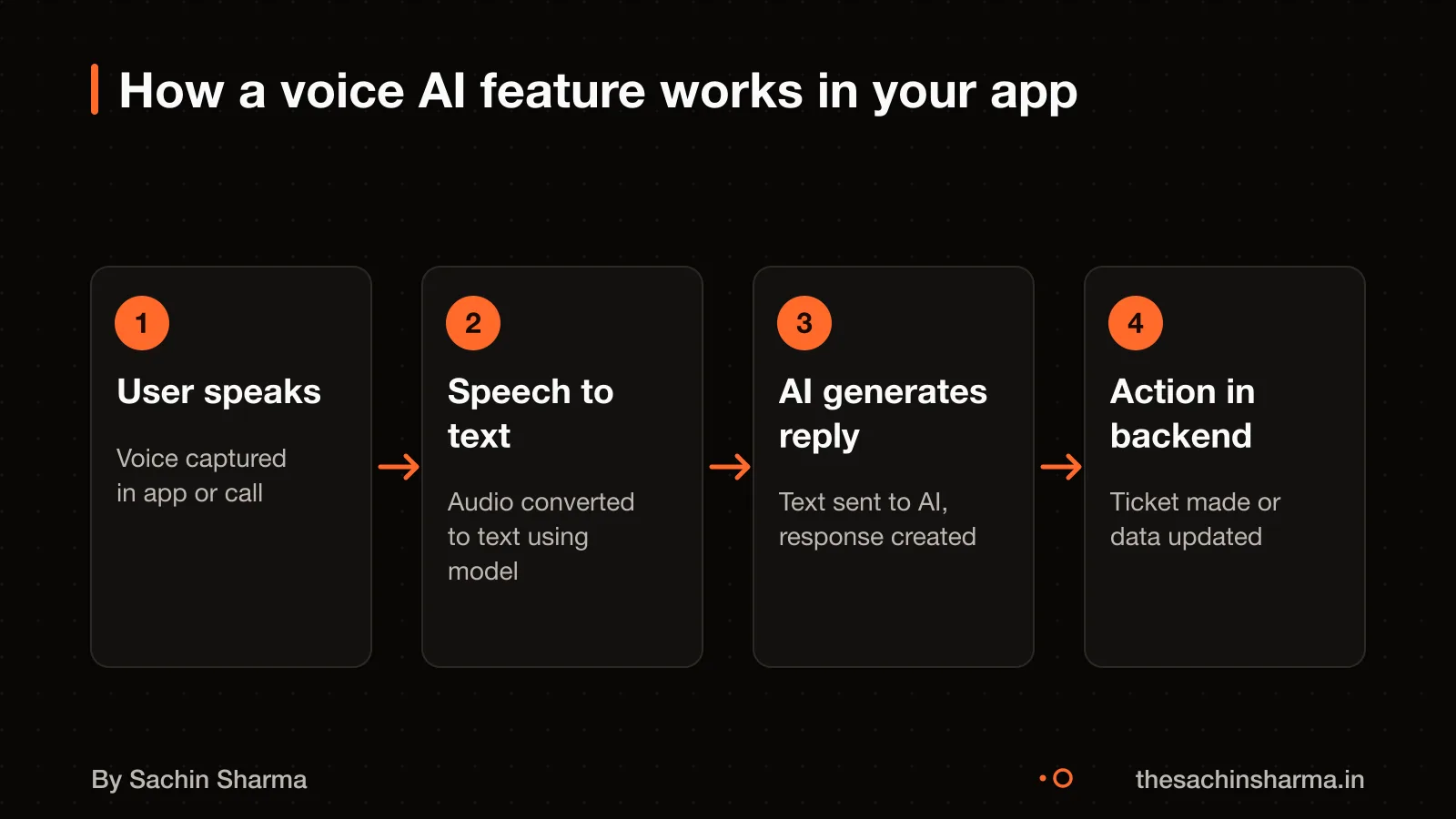
Building one starts with choosing a provider, setting up billing, and wiring model calls into your backend. Tools like Lovable’s built-in AI connector can simplify this by letting you describe what you want, and it sets up the links for you. For example, a voice call feature that books appointments needs speech-to-text, intent detection, and a calendar API call, all chained together.
Real-time voice models let users talk with your app in a two-way spoken conversation, even interrupting mid-sentence. During the call, the backend can look up records or save bookings, then speak the result back. This is different from a voice command that only triggers one action.
AI features in quick commerce apps can answer customer queries, summarise order history, or detect urgent messages by tone. AI features in quick commerce apps
When you really need AI (and when you don’t)
Use AI when your problem changes too fast for fixed rules or needs to understand meaning, not just match text. For example, sorting customer messages by mood or summarising long replies needs AI. If the task is simple and repeatable, like routing queries with keywords or filling forms from templates, a rule-based system is cheaper and more reliable.
Gemini 3.1 Flash Lite or GPT-5 Nano is the default for high-volume, simple text tasks where accuracy matters more than cost. But if you need deeper reasoning or longer context, switch to a stronger model like Gemini 3.8 Flash. As of 13 May 2026, 95% of Indian CXOs surveyed said AI has already been embedded into enterprise workflows.
AI is overkill if your data is too small, your goal is clear and static, or you can’t afford ongoing testing. Signs include needing the same answer every time, working with structured inputs, or having no way to check AI output. In these cases, automation with code is faster and safer.
For many tasks, you do not need AI at all. Simple logic can route, filter, or transform data just fine. If your use case runs the same way every time, it is better as a rule. Build with rules first, then add AI only where it adds clear value.
Automate with simple rules to save cost and avoid complexity when AI is not needed.
Cost of AI features
The main cost parts are API calls for input and output tokens, data grounding, and usage volume. You pay each time your app sends data to the AI and gets a reply. For example, a chatbot pays per user message (input) and AI answer (output).
Token prices depend on the model and type of use. As of 2026, Gemini 3.8 Flash charges $0.75 per 1 million input tokens and $3.75 per 1 million output tokens through December 31, 2026. Starting January 1, 2027, standard pricing of $1.5 per 1 million input tokens and $7.5 per 1 million output tokens will apply. Output tokens cost 3 to 8 times more than input tokens.
What changes the price? The model choice, output length, and data grounding. Grounding with your data is billed at $2.5 per 1,000 requests. A feature that pulls from your database on every query will cost more. Gemini 3.5 Transcribe Live charges $3.50 per 1 million audio input tokens and $21.00 per 1 million text output tokens.
Usage patterns matter most. A low-traffic internal tool costs little. A public app with long AI replies can add up fast. You must track token use per feature and set limits.
Want a number for your idea? Send one line on WhatsApp. I reply with what drives the cost and what to cut.
Message me on WhatsApp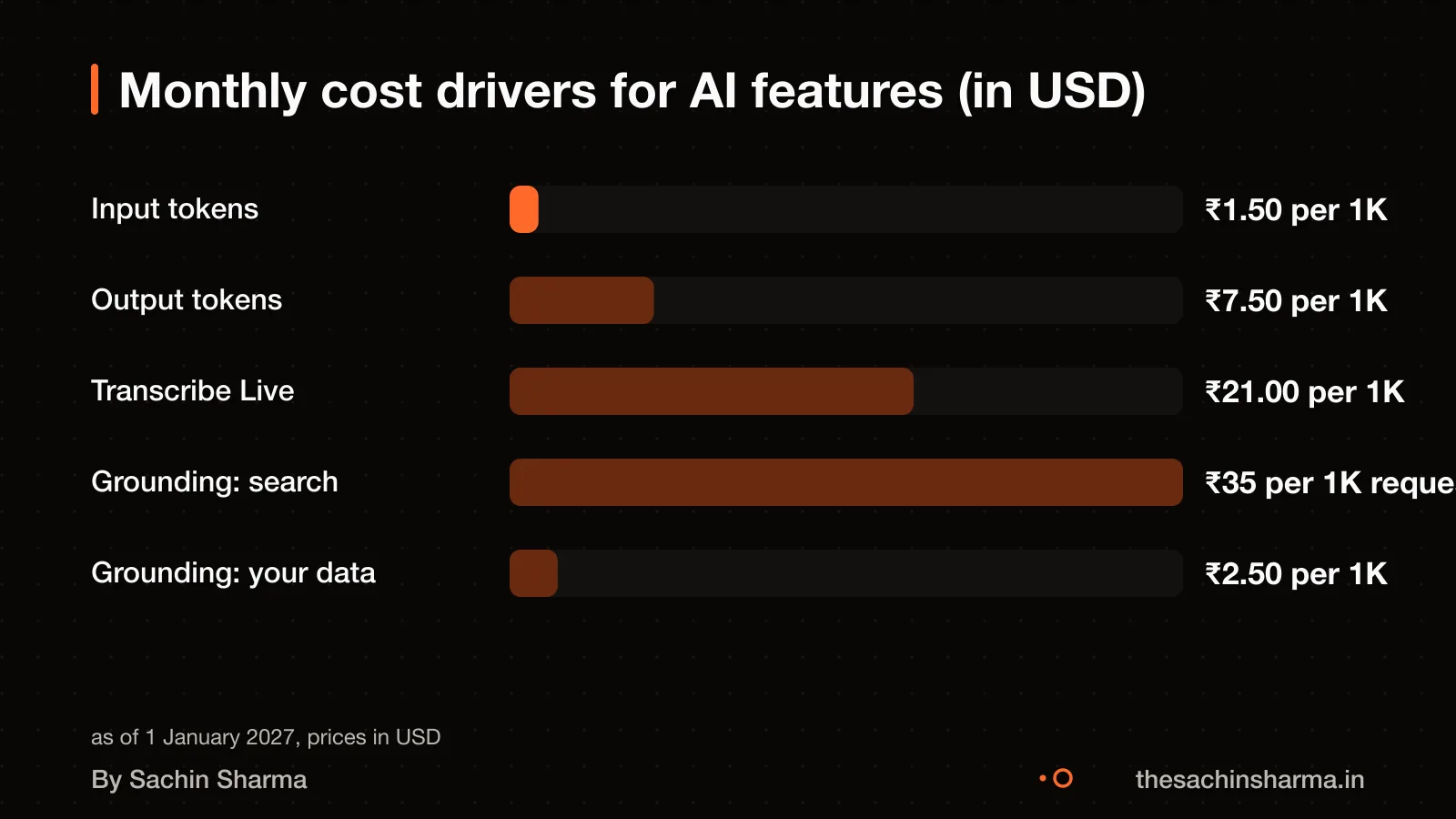
Building and choosing AI models
You should use cloud models for most tasks, on-device models when privacy is critical. Custom models only if you have unique data and a clear need. Cloud models like Gemini Flash are cheaper and fast, but send data off-device. On-device models keep data private but need more phone resources. Custom models, built by fine-tuning or prompts, cost more and take longer but can do specialised jobs.
You can switch if accuracy matters more than cost. For speech-to-text, Gemini 3.5 Transcribe is used when audio files are larger than 14 MB.
I usually avoid fine-tuning because it is expensive and slow. Instead, I use prompt tuning or RAG (Retrieval-Augmented Generation), which pulls in your data at runtime to guide the answer. If you do need fine-tuning, Supervised Fine-Tuning (SFT) is one method I can apply. Reinforcement Learning from Human Feedback (RLHF) is possible but rare for small apps.
In my project EHR Copilot, I used a cloud-based model with prompt engineering. I used RAG to turn session notes into structured summaries. The AI connector was enabled by default, and I controlled access through workspace settings.
Still unsure between cloud, on-device or fine-tuned models? Tell me your budget and timeline and I will say which fits.
Message me on WhatsAppHow to test AI features when they can’t be perfect
You check AI quality by testing outputs on real user tasks, not just code. Automated tests cannot catch every mistake because AI responses vary. Instead, run the AI on past user queries and compare results against human-reviewed answers. Use benchmarks in Python to evaluate AI models. This shows how well the model works before launch.
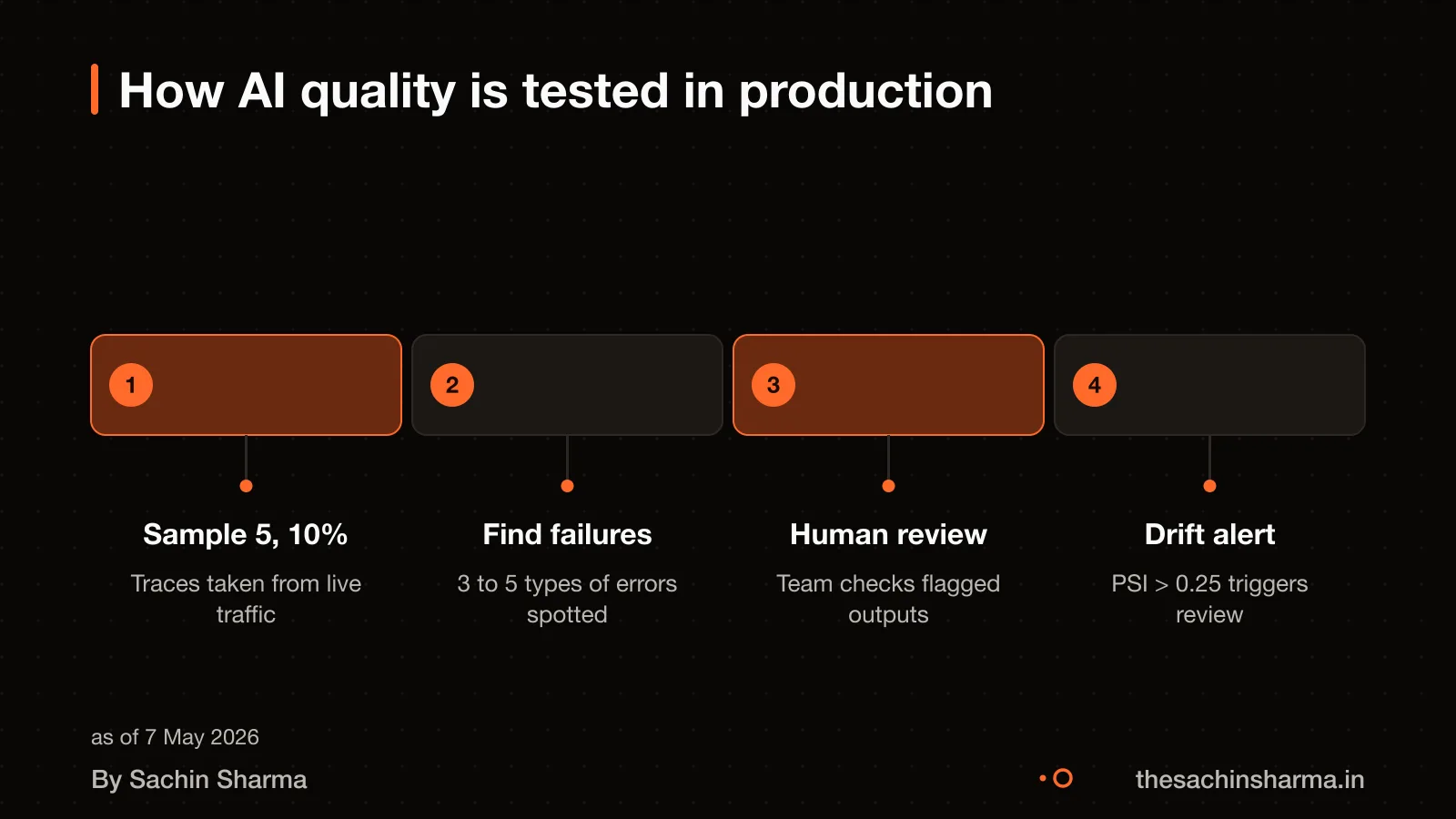
Sampling in production means reviewing 5 to 10% of live AI responses for a statistically meaningful signal. These are checked manually or with rule-based filters for errors like wrong facts or harmful language. This sample gives a reliable view of performance without reading every response. Set up logging to capture inputs and outputs securely.
You catch wrong outputs by watching for new failure types in the first month. Even strong pre-launch tests miss real-world issues. The first 30 days of real-user traffic almost always surface 3 to 5 new failure categories that survived every pre-launch check. For example, users might ask the same question in a way the AI did not expect. Review logs weekly and update prompts or add guardrails when problems appear.
What happens after launch: monitoring and drift
Yes, AI features need ongoing checks. They can break silently when user behaviour changes, so monitoring is not optional. One key risk is input drift. Input drift occurs when the kind of user prompts shifts from what the system was trained or tuned for. For example, if your app starts getting more slang or regional phrases than during testing, the AI may respond poorly.
Drift is measured using metrics like Population Stability Index (PSI). PSI values from 0.1 to 0.25 suggest moderate drift and require investigation. One way to track this is by embedding user prompts and comparing their distribution over time. If the PSI crosses 0.25, it often means retraining or prompt redesign is needed.
Even if the AI seems to work at launch, unseen shifts in input can degrade performance. Regular checks help catch this early. I set up logging and alerts for prompt patterns during delivery, so you can act before users notice. For long-term health, review logs monthly and test edge cases quarterly.
Rescue a failing AI feature if monitoring shows declining accuracy or user complaints rise.
Risks of AI: wrong, biased or harmful outputs
Yes, AI can give factually wrong answers, even when it sounds confident. It may invent details, mix up facts, or give outdated advice. This is not a bug, it is how large language models work. They predict text, not truth.
If your app uses AI to reply to customers, it might say something off-brand or inappropriate. For example, it could use casual slang when your brand is formal, or skip key disclaimers.
To reduce harm, I always add guardrails. These include prompt constraints, content filters, and human-in-the-loop checks for sensitive outputs. No AI goes live without a fallback, like a “I cannot answer that” response.
For high-stakes cases, such as legal or medical advice, the AI output is flagged for review before being shown. In Legease, my AI legal-document app, every generated clause is marked for user verification. This keeps control with you.
AI laws and rules in India
India does not have a unified AI law yet. Right now, AI tools and services are governed by the Information Technology Act of 2000 and the Information Technology Rules of 2022. These cover general digital safety and data handling but are not made just for AI.
New rules are coming soon. The government will release a draft consultation paper on AI regulations within 30 days. The draft will focus on safety, security, a human-first approach, skilling, inclusivity, and limiting harm.
This means you must design AI features that are safe, explainable, and do not replace human judgment in critical areas. Since the rules are not final, keep your AI systems easy to audit and update. For legal compliance in your app, talk to a technology lawyer familiar with Indian IT law.
Who owns the AI model and data pipeline?
You own the code I write for your app, but not the AI model itself. The AI model is a tool I use, like a compiler or library, and stays with the provider. You can move the code to another developer, but they will need access to the same AI service to run it.
Most AI features rely on cloud-based models such as Gemini or GPT, which you access through an API. You do not own these models. If you stop paying for the API, the feature stops working. This creates a small lock-in to the AI provider, not to me.
The data pipeline, how your app collects, cleans and sends data to the model, is custom-built for you. You own this logic and can reuse it. But if it is tied to a specific AI model’s format, switching models may need rework.
For full control, on-device models exist, but they are limited. They run locally, so no API calls, no lock-in, but they are less powerful and harder to update. I use them only when privacy is non-negotiable.
Ownership of training data, prompts and outputs depends on the AI provider’s terms. Google and OpenAI allow you to own your input and output data, but check the latest policy. I do not store your data unless you ask.
If you want full ownership and no third-party dependency, we would need to train and host a custom model. This is expensive and slow [unknowns]. It is only worth it if you have unique, high-value data and long-term plans.
What you need to provide for the AI feature
You must give clean, structured data, API access where needed, and approve key prompts and decisions. Without these, the AI feature cannot work as intended.
You need to grant API access if the AI must pull live data from your systems. The AI uses this access to fetch up-to-date information before responding.
You must also make choices on how the AI behaves. This includes writing or approving the prompts that guide its responses. For instance, you decide whether it should sound formal or friendly, and what to do when it does not know an answer. These choices shape how users experience the feature.
When this advice does not apply
When this advice does not apply
This method is not for you if you need a fully custom AI model trained on your own data from scratch. Building such models requires deep AI expertise and large datasets. For most apps, using trusted cloud models like Gemini or GPT is faster and cheaper.
It also does not apply if you are in a high-risk sector like finance or health, where mistakes can harm people. In these cases, AI must follow strict rules and checks. For example, my EHR Copilot tool helps doctors by turning session notes into structured records, but it does not make decisions, the doctor does.
If your AI project has already failed, this guide will not fix it. You may need a full review or rebuild.
Related reading: How EHR Copilot was built.[[cta]]Fix a failed AI project to get back on track. [[cta]]Next step: message me on WhatsApp with what you want to build. No forms, no sales team.
Assumptions behind the numbers
- Average token count per request is estimated based on typical use cases.
- Usage is spread evenly across the month.
- No retraining or fine-tuning costs are included.
- INR-USD conversion uses market rate as of April 2025 (₹83 = $1).
What is in it, and what is not
Estimate your monthly AI feature cost based on model choice, input/output volume and grounding method. Prices from official cloud pricing as of October 2026.
- 01Model selection
Choose from Gemini Flash, Transcribe Live, or Flash-Lite TTS based on your feature type.
- 02Token-based pricing
You pay only for the input and output tokens used each month, not for idle time.
- 03Grounding options
Add grounding with your data or Google Search for factual responses.
- 04Monthly cost estimate
See estimated monthly cost in ₹ based on your selections and usage.
How it runs: milestones you can test
- 1Model and scope chosen
You can test: Model type, expected token volumes and grounding method are selected.
- 2Integration tested
You can test: API calls work in staging with sample inputs and outputs logged.
- 3Usage tracking live
You can test: Token usage and cost metrics appear in your cloud billing console.
- 4First month’s bill shared
You can test: Actual or estimated monthly cost broken down by component.
Right for you if
- You need a chatbot, summary tool or document assistant.
- You have clean data and can check AI outputs regularly.
- You're adding AI to an existing app, not starting from scratch.
Look elsewhere if
- You expect free or one-time AI costs.
- You need custom models trained on private data.
- You want rule-based automation, not language understanding.
How it is priced
Cost is calculated from official cloud prices multiplied by your estimated monthly token usage. Prices change after introductory periods. Grounding and speech models cost more. No hidden margins—this is pass-through cloud spend plus my integration fee.
Questions to ask before you sign, with anyone
- Which model fits my use case?
- How do I track token usage?
- What grounding method do I need?
- Is my data safe with cloud models?
Quick answers
What is a token?
A token is a piece of text, roughly 4 characters in English. Words are split into multiple tokens if they are complex or rare.
Are output tokens more expensive?
Yes, output tokens cost 3 to 8 times input tokens depending on the model.
What is grounding?
Grounding connects the model to your data or live sources to give factual replies instead of guesses.
Do prices change over time?
Yes. For example, Gemini Flash pricing doubles from December 2026 to January 2027.
Can I use free tiers?
Yes, up to 1,500 grounded prompts per day are free, but paid tiers apply beyond that.
How much does speech-to-text cost?
Transcribe Live costs $3.50 per million audio tokens, or about ₹300 for 50 hours of speech.
Who pays the cloud bill?
You pay the cloud provider directly. I show you how to set up billing alerts.
Questions people ask
01What does the engineer actually decide on AI feature development?
The engineer chooses the AI provider, sets up API keys and billing, secures credentials, and connects model calls to the backend. Lovable’s built-in AI connector can handle this setup automatically. This means you describe what you want, not how to build it.
02Which skills matter most for AI feature development?
Key skills include prompt engineering, RAG (Retrieval-Augmented Generation), SFT (Supervised Fine-Tuning), monitoring, and security. These help shape model behaviour, ground responses in data, and keep the system reliable and safe.
03How do I test if an AI feature is working as promised?
Sample 5 to 10% of production traces to get a statistically meaningful signal. Run benchmarks and evaluations to check for drift. This sampling range gives a statistically meaningful signal for most systems.
04Can I avoid API costs by using open-source models?
Yes, you can use open-source models to avoid recurring API costs. But you must manage hosting, updates, and scaling yourself. This shifts cost from usage to maintenance.
05What if the AI gives wrong legal or financial advice?
Never let AI make final decisions on legal or financial matters. Use it only for drafts, with human approval required before action. AI can sound confident even when wrong. Check this for your case with a chartered accountant or lawyer.
06Do you fine-tune models for each client?
Fine-tuning is done only when needed. Most cases use prompt tuning or RAG instead. These methods are cheaper and faster, and work well for common tasks.
07How do you handle user data privacy in AI features?
We mask personally identifiable information (PII), use secure APIs, and avoid logging sensitive data. This reduces risk when sending data to external AI providers.
08What happens if the AI provider changes prices or shuts down?
We build abstraction layers to isolate the provider. Monitor for pricing changes and have fallback models ready. For example, Gemini 3.8 Flash input pricing changes from $0.75 to $1.5 per 1M tokens after December 31, 2026.