
What is a cloud kitchen app?
A cloud kitchen app is a digital system for food businesses that prepare meals exclusively for delivery or pickup. A cloud kitchen app is designed for businesses without dine-in facilities and may include features like kitchen management and delivery tracking. It may include a customer ordering interface, kitchen management dashboard, delivery tracking module, payment integration, and inventory and analytics systems. The app connects core parts like menu management, kitchen tickets, payments, customer data, analytics, and admin controls in one system. It helps track orders, manage queues, notify kitchen staff, and integrate with delivery riders through a mobile or web platform.
For a full list of features such apps should include, see Must-have features in a cloud kitchen app.
Do you need a custom app if you sell on aggregators?
You can manage Swiggy and Zomato orders in one place without a custom app by using third-party tools that pull data from both platforms. These tools offer real-time insights and automate pricing and menu updates across regions. However, direct access to Zomato’s data extraction API is limited, which may restrict deeper analysis.
A custom app makes sense when you want full control over branding, customer experience, and profitability. If you rely only on aggregators, you pay high commissions and lose direct contact with customers. A custom app lets you build your own brand, collect customer data, and keep more profit per order.
But if your sales are mostly on Swiggy and Zomato, and you only need to track orders. Pricing, a lightweight integration or dashboard may be enough. You do not need a full app unless you plan to push direct orders, run loyalty campaigns, or manage multiple brands.
Build or buy: custom, white label or platform? compares your options based on size, budget and long-term goals.
What drives the cost of a cloud kitchen app?
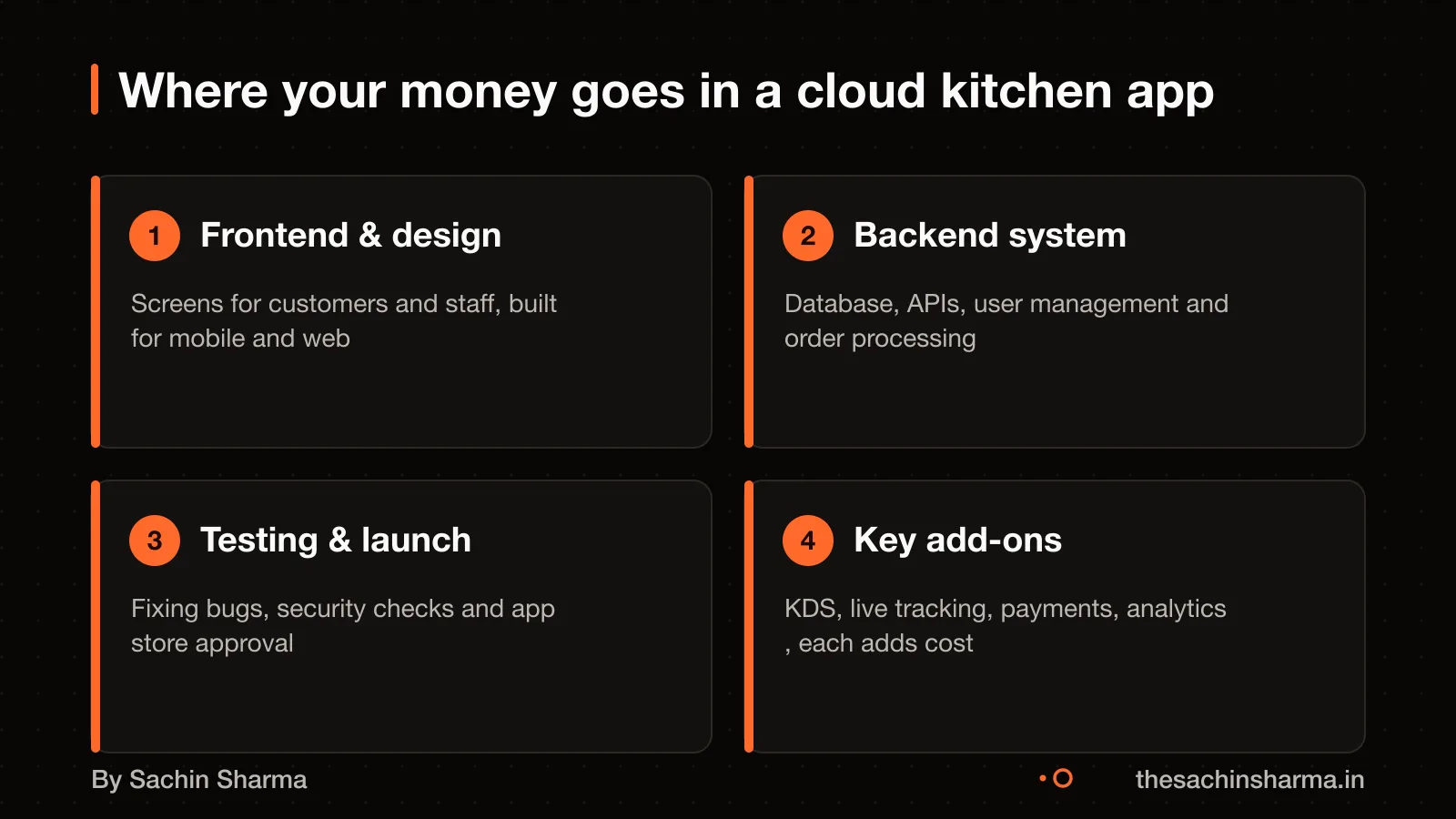
The biggest cost drivers in a cloud kitchen app are real-time systems, secure payment handling, complex UI/UX, and AI features. These raise costs because they need skilled work, strict rules, and strong backend support. Real-time order tracking and instant payments are features that should be able to work. Firebase databases push updates in real-time to connected clients every time data changes.
Secure payments are not optional. You must support multiple methods, fraud checks, and fast processing, all while meeting financial rules like PCI-DSS. This means more development time and third-party tools, which adds to cost. A clean, easy-to-use interface is key to success. Each screen must guide the user smoothly from browsing to checkout.
AI-driven recommendations personalise the experience by using past orders, trends, and dietary needs. Building this requires data models and ongoing tuning. Simpler apps skip this, but you lose a way to stand out. Backend choice affects price too.
Complex features mean higher upfront cost, but they can reduce long-term churn. If you skip them, you risk a poor user experience. The best tech stack balances speed, cost, and growth Best tech stack for a cloud kitchen app.
How much does a kitchen display system (KDS) add to cost?
A kitchen display system (KDS) replaces printed order tickets with digital screens in the kitchen that show orders directly from the POS. It helps your team see what needs to be prepared, which items have changes, and which orders should move next.
The total cost of a KDS depends on several factors: the number of kitchen stations. Hardware for screens, setup, support, and integration with your POS. As an estimate, the software alone costs ₹1,700 to ₹3,400 per screen each month (based on $20 to 40 at ₹85 per dollar).
Hardware costs extra and varies by screen size and durability. Touchscreen monitors meant for kitchens can cost ₹10,000 to ₹25,000 each. Mounts, cabling, and a local network upgrade may add ₹15,000 to ₹40,000 for a small setup.
POS integration is often the most complex part. If your POS does not support KDS out of the box, custom APIs or middleware may be needed. This can add ₹50,000 to ₹1.5 lakh to the initial setup, depending on how much data must be mapped.
Support and training are usually billed yearly. Some providers include setup, others charge ₹10,000 to ₹25,000 for on-site help.
For a 3-station kitchen with 4 screens, expect a one-time setup cost of ₹80,000 to ₹1.75 lakh. A monthly software cost of ₹6,800 to ₹13,600.
The cost difference between single-brand and multi-brand apps is not known. The cost impact of live delivery tracking is not known. Development time for a cloud kitchen app is not known. Phases in building a cloud kitchen app are not known. Typical inclusions in a developer quote are not known. App maintenance cost details are not known. White label app suitability for small kitchens is not known. No-code tool pros and cons are not known.

What are the hidden ongoing costs?
You should expect ongoing costs for app maintenance and third-party services like APIs and cloud usage. Maintenance takes 15 to 20% of the initial development cost each year. This covers safety patches, updates, and small feature improvements. Third-party services such as Google Maps API, payment gateways, and AI tools can add $500 to $5,000 per year. This depends on how much you use them.
For example, Firebase Cloud Firestore gives you 1 GiB of stored data. It gives 10 GiB/month of network egress. It gives 20,000 writes/day and 50,000 reads/day for free. Once your app grows beyond these limits, you pay for what you use. A busy cloud kitchen with high order volume can quickly exceed free tiers. So monitor usage closely.
For example, if your app sends real-time updates to customers about their order status, each update counts as a write and a read. A single order might trigger five or more database operations. Over a month, this adds up. You can reduce costs by batching updates or caching data on the user’s phone.
Ongoing costs are not just technical. They require active management. Review your cloud and API bills monthly. Turn off unused features. Use tools that show usage trends so you can predict spikes.
Ongoing costs in quick commerce apps follow a similar pattern, especially in real-time tracking and payment handling.
Want a number for your idea? Send one line on WhatsApp. I reply with what drives the cost and what to cut.
Message me on WhatsAppWhat is the cheapest way to start taking direct orders?
You can start taking direct orders with WhatsApp or a simple website. Both let customers place orders without needing a custom app. A website with a menu and contact form can go live fast. WhatsApp works right away if you already use it for business.
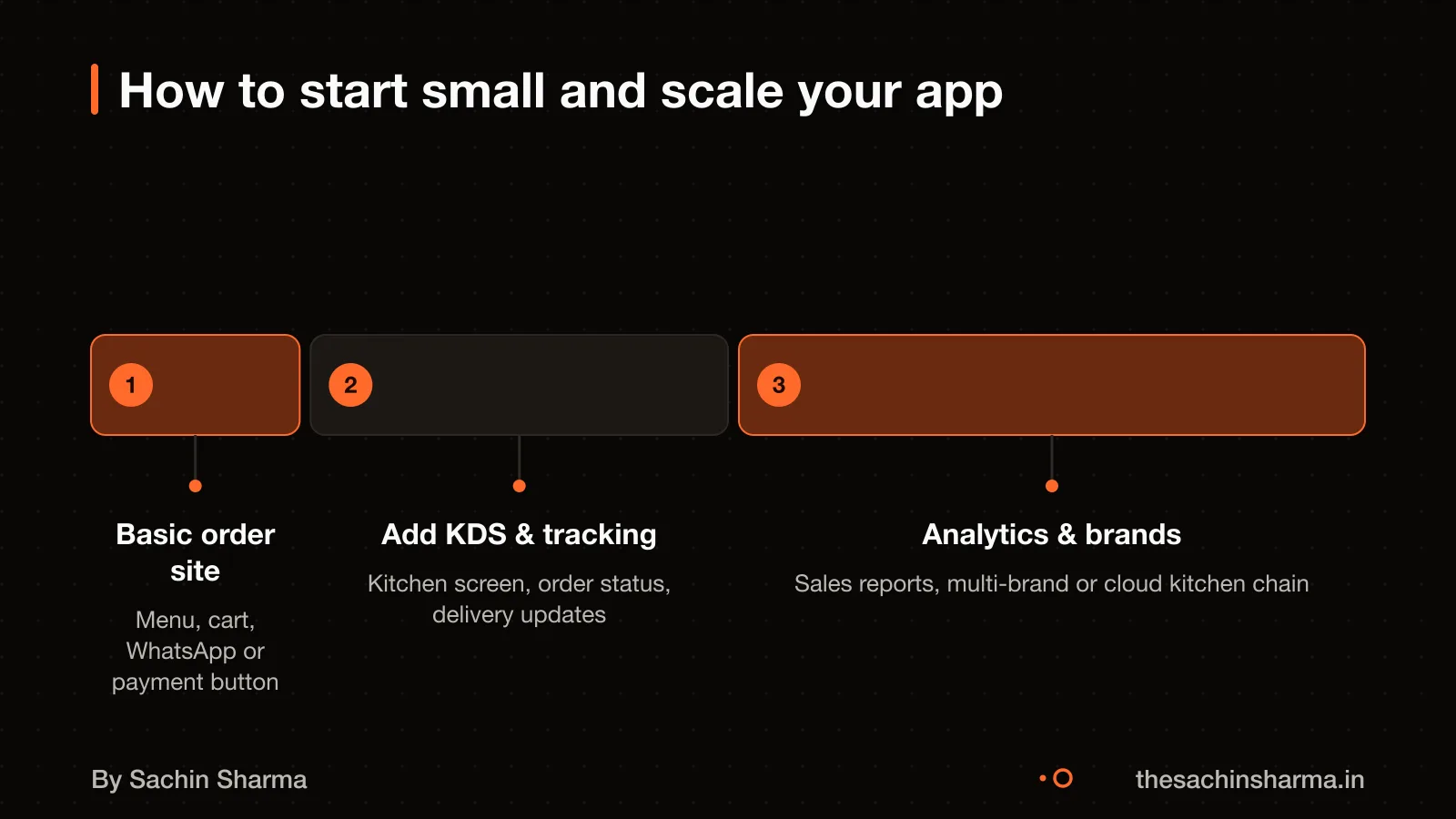
Start with an MVP if you want to test demand with less risk. An MVP includes only core features like menu display, order form, and payment. It helps you check if customers will order directly before spending more. Launching basic features first can confirm your idea is viable.
For example, a single-location kitchen can begin with a Next.js site that shows the menu. Takes orders via form, and accepts UPI through a payment link. You manage orders over WhatsApp or phone. This setup costs under ₹50,000 and takes 2 to 3 weeks.
Once orders grow, you can add features like user accounts or delivery tracking. But at the start, low-cost tools reduce your risk while you learn what customers want.
How to build a cloud kitchen app covers the steps to move from a simple site to a full app when the time is right.
Can you start with an MVP and add features later?
Yes, you can start with an MVP and add features later. This reduces risk by letting you test demand with a smaller investment. You learn what users actually want before spending more. Building in stages helps avoid wasted effort on unused features. You stay flexible and can adapt based on real orders, not guesses. Start small, prove the idea, then expand.
What are the risks of building a cloud kitchen app?
A weak backend can slow your app, break payments, and delay orders during busy times. If your system cannot handle peak load, customers may see errors or long waits when placing orders. This hurts trust and repeat sales. For example, a sudden rush from a social media post could overload an underbuilt server.
A Firebase Realtime Database instance supports up to 200.000 concurrent connections. It also allows 1.000 write operations per second. If your kitchen grows fast or runs promotions, you may hit these limits. Once hit, new orders may fail or not sync in real time. This can cause missed or duplicated dishes.
Real-time databases like Firebase work well for small to mid-sized kitchens. But they are not designed for high-frequency writes from multiple outlets. You may need to switch to a custom backend later. That adds cost and delay.
Indian data laws require proper consent and storage of customer data. A poorly built app might not meet DPDP Act rules. You must design consent flows that let users control their data. See the guide on DPDP Act: consent flows an Indian app actually needs to avoid legal risk.
How can you verify a developer's quote?
A trustworthy quote should list every feature, third-party tool, and phase of work, so you can see what you are paying for. It must also state if source code ownership transfers to you. Avoid vague quotes that bundle everything into a single number without breakdowns.
To check a developer’s experience, look at their past projects in food tech or real-time systems. For example, Actowiz Solutions has delivered 4,000+ projects across 50+ countries. They use 200+ in-house experts for scrapers, AI/ML models, APIs, and data quality assurance. Octal Software has completed over 2,300 projects across industries. High project counts and technical depth suggest reliability.
Have a quote in hand? Send it to me and I will mark what is missing.
Message me on WhatsAppWho owns the source code after the app is built?
You own the source code only if your contract says so. Developers do not own the code by default, but they often retain rights unless a transfer is agreed. To transfer ownership, your contract must state that all source code, design files and backend systems will be handed over to you. Without this, you may not get full control.
For iOS apps, Apple requires extra steps. You must turn off TestFlight beta testing before transfer. You must also remove all Xcode Cloud data linked to the app. After transfer, the old owner cannot generate promo codes for your app. A shared secret for subscriptions stays with the app but should be rotated after transfer.
As an example, if you hire a developer to build your cloud kitchen app. Ask for a clause that delivers all code and access on final payment. Use a legal advisor to confirm the transfer terms.
When this advice is wrong
When this advice is wrong
Do not build a custom app if you get 70 to 95% of your orders from aggregators like Swiggy or Zomato. In that case, the cost of a custom app may not pay for itself. You are better off using low-cost tools that sync your menus and prices across platforms.
This advice is also wrong if you lack in-house tech support or a trusted developer. Without someone to fix bugs, update systems, or handle crashes during peak hours, your app can fail when you need it most. A simple website or WhatsApp ordering may be more reliable for now.
Next step: message me on WhatsApp with what you want to build. No forms, no sales team.
Message me on WhatsAppAssumptions behind the numbers
- No editable weeks, team size or daily rate shown
- Removed toggles for KDS, live tracking, multi-brand
- Fees listed are known and fixed: Google Play ₹2,500 one-time, Apple $99/year, payment gateway 2–3%, cloud hosting usage-based
Work out your own number
I won't hand you a number that pretends to be the market. Instead, here is the working: set the weeks, the people and the rate, and see where the money goes.
Your working total
₹4,40,00011 weeks × 2 people × 5 days × ₹4,000- Scope and design18%
- Build55%
- Testing and fixes18%
- Launch and stores9%
The weeks shown are an example of a small app, there to be changed. Fees you pay others (store accounts, cloud, SMS) are not in this total.
What moves the price
- More screens or roles
Each extra user type (customer, admin, rider) is close to another app.
- Real-time features
Live tracking and chat need more design and more testing.
- Many integrations
Every payment, SMS, maps or ERP link is its own piece of work.
- Cutting to one platform first
Starting with one clear flow can be half the work.
- Using managed services
A managed backend for login and data removes weeks.
- A clear scope up front
Changes mid-build are the most expensive weeks.
Fees that go to someone else
Google Play developer account
₹2,500 one-time fee paid to Google.
Apple Developer Program
$99 yearly fee paid to Apple.
Payment gateway
2–3% per transaction, billed by the provider.
Cloud hosting
Usage-based, billed by the provider to you.
Ask for these before you sign
- How many weeks per phase, and with how many people?
- What is not included?
- Which fees do I pay to others directly?
- What happens to the price when I change my mind?
- What does the first month after launch cost?
Questions people ask
01Which components drive the cost of a cloud kitchen app?
The main cost drivers are real-time sync, kitchen display systems (KDS), secure payment gateways, complex UI/UX, and AI features. These need skilled developers and strong backend support to work reliably during peak loads.
02Where do estimates for a cloud kitchen app usually go wrong?
Estimates often miss ongoing costs, backend scaling under real-time load, and third-party service fees. A weak backend can cause failed transactions and delays during peak hours.
03What can be cut without hurting the product?
Start with an MVP that includes only core features like menu, cart, checkout, and order tracking. Skip the KDS at first and use a single platform to reduce cost and complexity.
04Does GST apply to app development in India?
GST may apply to app development services depending on your registration and use. Input tax credit is available only if the app is used for business purposes. Check this for your case with a chartered accountant.
05Who owns the source code after the app is built?
By default, the developer owns the source code. You must sign a contract to transfer ownership to you. Always ask for code ownership in writing before starting the project.
06What are the app store fees for publishing?
Some countries add VAT, such as 20% in Morocco and 18% in the Republic of the Congo.
07How much does live delivery tracking add to cost?
The exact cost of live delivery tracking is not known. It adds GPS integration, real-time updates, and backend load. The cost depends on how many orders you handle and how often the location updates.
08Can one app manage multiple kitchen brands?
Yes, a multi-vendor architecture can manage multiple kitchen brands from a single dashboard. This increases backend complexity and testing needs, but allows unified operations.
09What are the key integrations a cloud kitchen app needs?
Common integrations include payment gateways, POS systems, SMS services, and delivery APIs. The exact needs depend on your kitchen’s workflow and order volume. Start with payment and POS, then add others as needed.
10How many direct orders do you need to justify the app cost?
The number of direct orders needed to justify the app cost is not known. It depends on your profit margin per order and how much you save by avoiding third-party commissions. Estimate based on your average order value and delivery cost.