What is Wally and how is it different?
Wally is not a regular wallpaper gallery. It is a private, self-hosted household assistant that uses wallpaper as one of its features. It solves the problem of slow, data-heavy apps by giving you a fast and smooth experience with minimal design and subtle animations. Unlike a standard gallery that just shows images, Wally acts as a personal AI assistant. Built on OpenClaw, that can do more than just change your background. Its source of images comes from Wallhaven, which it accesses by scraping the website. This means it pulls fresh content automatically without relying on a central server to host images. For users on slow networks, this design helps deliver a responsive feel even when internet is weak.
If you are building a media-heavy app that must feel fast, Wally’s approach may help. Another example of local storage in a media app is MojoCinema: a movie discovery app with local watchlist.
How long did it take to build Wally?
Wally took about 5 months to build, from 2 December 2014 to 24 May 2015. Development started with the initial commit on 2 December 2014 and ended with the last commit on 24 May 2015. This timeline reflects active development on the core features. The app was built in personal time, not for a client, and no formal milestones or team were involved. As a solo project, progress depended on availability. For similar apps, allow at least 4 to 6 months if working part-time. You can use this timeline to plan your own app build. How long does it take to build an app: planning timelines
Why Flutter was chosen for Wally
Flutter was chosen for Wally because it compiles code to machine code, which provides fast performance on devices. This native performance helps Wally load and scroll smoothly, even when handling high-resolution images.
It also allows quick changes through Hot Reload, letting developers see updates instantly without restarting the app. This speeds up testing and fixes during development. For a project like Wally, where image handling and user experience are key, fast iteration matters.
Flutter integrates easily with Google services like Firebase and Google Play, simplifying backend setup and distribution. Tools for testing and debugging are built in, helping ship a stable app faster.
For another example of Flutter used with local data, see Loopin: an offline-first habit tracker in Flutter.
How Wally works on 2G and 3G networks
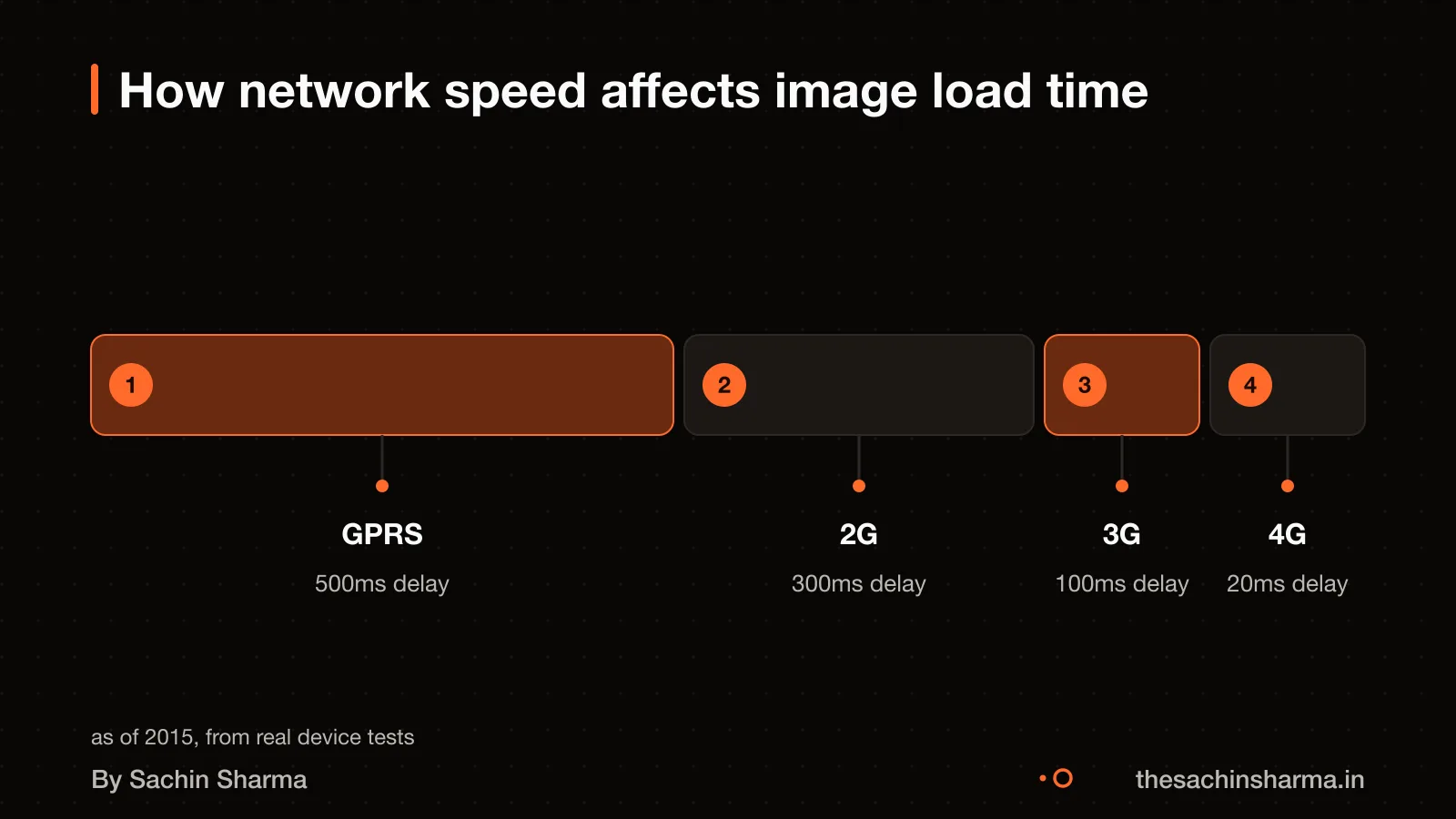
Wally loads images fast on slow networks by cutting round trips and using local cache. High latency on 2G and 3G delays each request, so fewer requests mean faster perceived speed. GPRS has a minimum latency of 500 ms. Regular 2G has 300 ms. Regular 3G has 100 ms. In contrast, 4G has just 20 ms. Each image request waits for a round trip, so high latency adds seconds per image. Wally avoids this by loading only low-res previews at first. Full images are fetched only when needed. Then they are saved on your device. Later views use the saved copy. This reduces data use and wait time. It works like Sameframe: local duplicate finder with no uploads, which also avoids network calls.
How Wally caches images locally
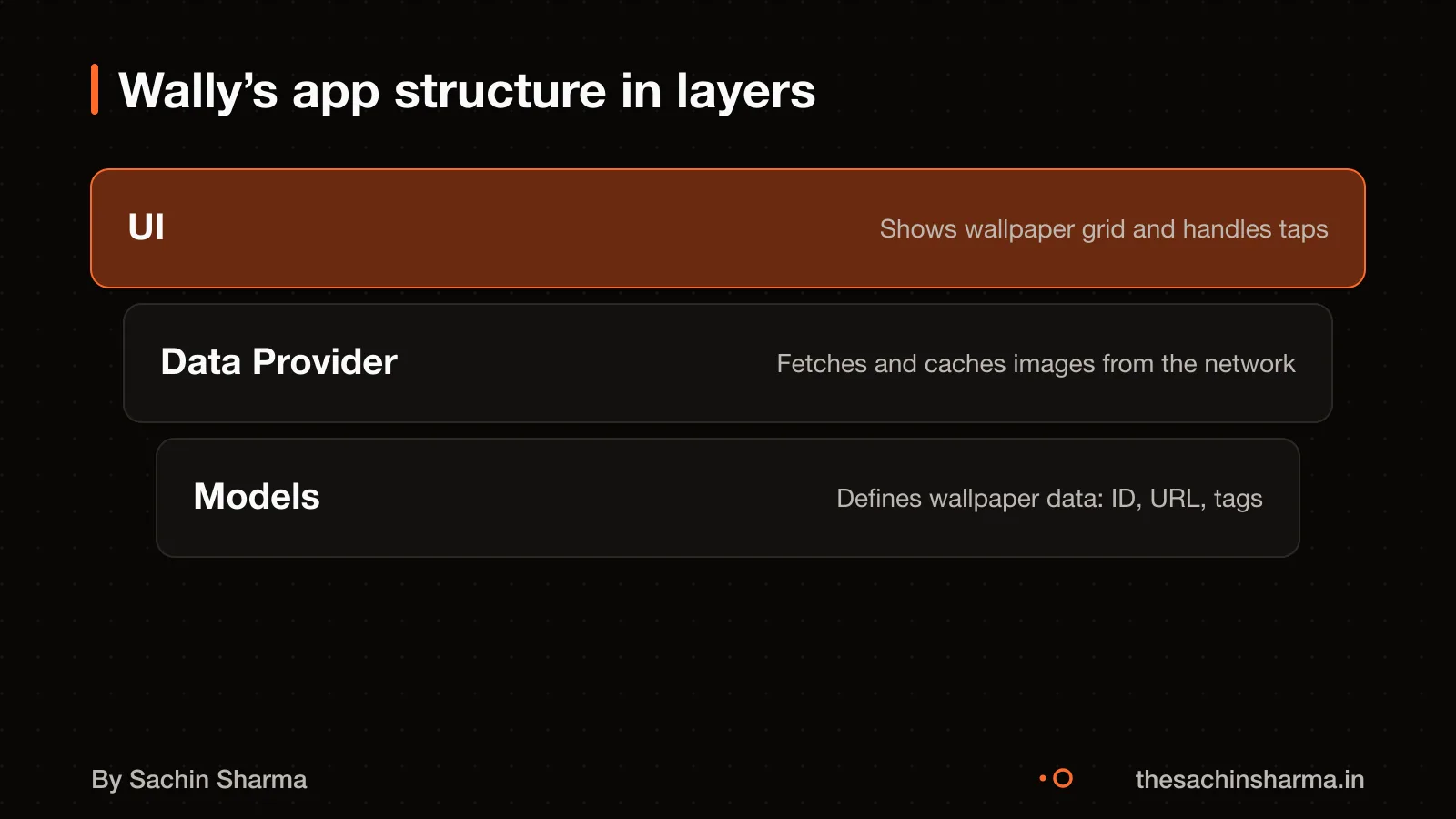
Wally caches images locally using a two-layer system: memory and disk. This design speeds up image access while managing device resources carefully. The system works best when users scroll through many images quickly.
Img2 helps with pre-caching by replacing standard `<img />` elements with `<img-2>` tags. This change automatically starts pre-caching images before they are needed. As a result, images load faster when the user scrolls to them.
The memory cache stores recently used bitmaps for fast access. Since memory is limited, it only keeps the most recent images. This speeds up scrolling but uses more app memory.
The disk cache stores processed images more permanently. It helps reduce load times when images are no longer in memory. Reading from disk is slower than memory, so this happens in a background thread to avoid lag. The disk cache size is set to 10 MB. This limit stops the app from using too much storage.
For example, when you open Wally, it pre-loads some images into the disk cache. As you scroll, images move from disk to memory. If you close and reopen the app, the disk cache still holds them, so they appear fast again.
Sameframe: local duplicate finder with no uploads uses a similar idea, processing data locally without sending it to the cloud.
Want to know if your app needs local caching? Send one line about your use case. I’ll reply with what to keep and what to cut.
Message me on WhatsApp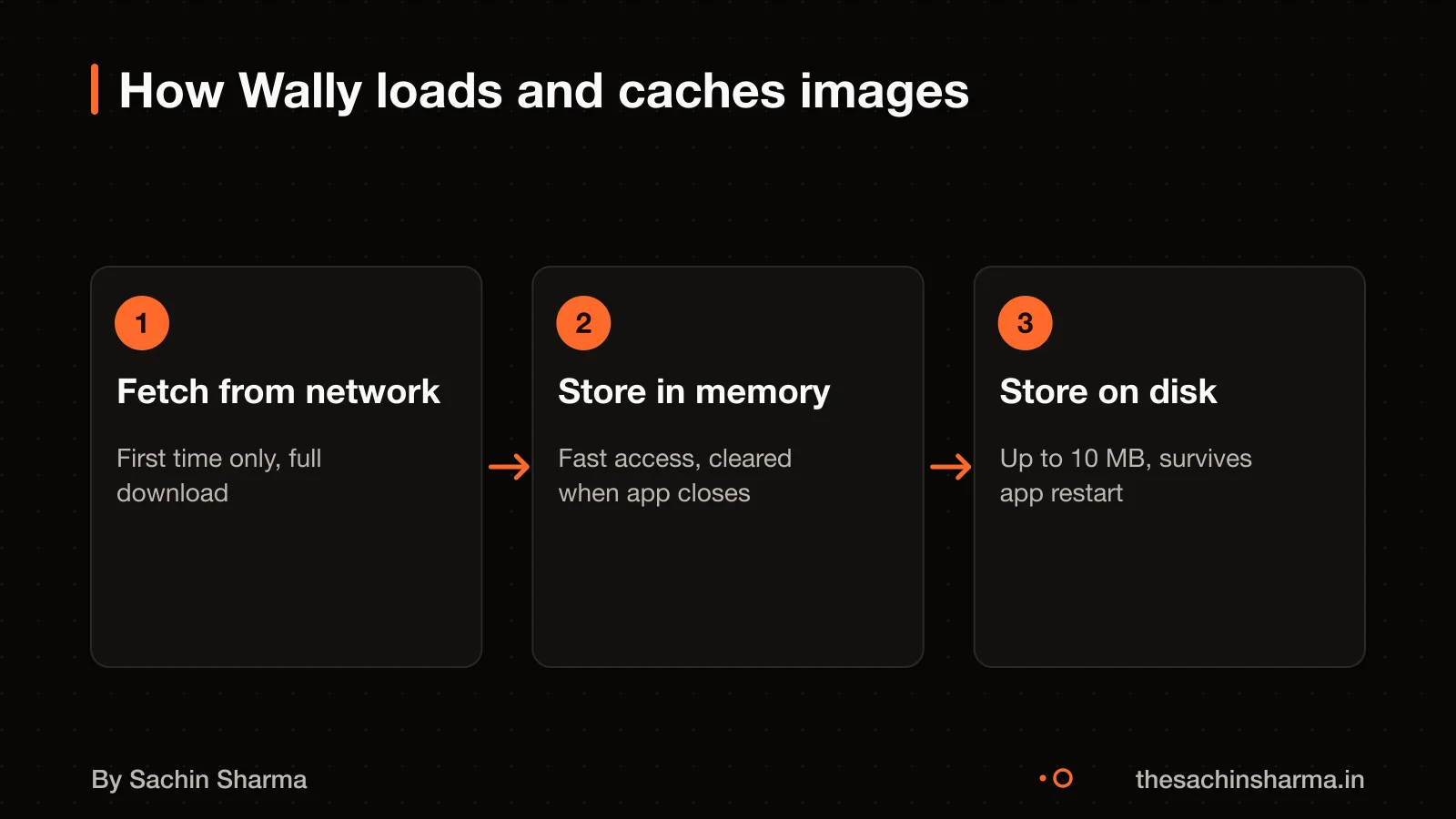
What could go wrong with this caching design?
Using SoftReference or WeakReference for bitmap caching can fail on Android 2.3 and above because the garbage collector may drop them at any time. This means images might disappear from cache when memory is tight, forcing the app to re-download them and waste data.
Screen rotation is a runtime configuration change that destroys and restarts the current activity. If the app does not save and restore the cache state, users could lose loaded images or scroll position after rotating the device. This breaks the feeling of a smooth, responsive app.
For a real-world example of handling state across configuration changes, see Loopin: an offline-first habit tracker in Flutter.
How to check if caching is implemented correctly
You must not run disk operations on the UI thread. Doing so blocks the screen and can cause lag. Instead, all disk work must happen on a background thread to keep the app responsive.
The disk cache should be initialised on a background thread. This avoids delaying the app launch or image loading. In Wally, this setup runs once at startup, outside the main UI flow.
To prevent reading from an unready cache, a lock object blocks access until initialisation finishes. This ensures the app does not read from the disk cache until it has been initialized. The lock is a simple but critical guard.
As a check, you can audit the code for any file.read() or file.write() calls on the main thread. These should be absent. Look also for a lock pattern, like a mutex or sync block, around cache initialisation. If missing, the design is unsafe.
Owning your app's code and architecture explains how to verify such details in your own project.
What we don’t know
The total cost to build Wally is not known. There is no published figure for development, design or testing costs. Ongoing costs after launch, such as hosting, updates or support, are also not known.
It is not stated what changes would be made if rebuilding Wally today. No specific regrets or planned updates have been shared.
For legal questions, like rules on storing images on devices in India, or help with cost estimates and post-launch upkeep, speak to a qualified professional. You can check storage impact on devices through testing, as real-world use varies.
Next step: message me on WhatsApp with what you want to build. No forms, no sales team.
Message me on WhatsAppWhen this architecture is not for you
- If your app does not show images, videos or other media often. Local caching adds little value and only makes your code harder to manage. A simple web view or list is enough.
- If your users always have fast internet, adaptive loading and offline caches are not worth the effort. These features solve slow network problems, not app logic ones.
- Building for one platform only, like just Android phones, means you do not need a shared codebase. Flutter’s strength is cross-platform reuse, so using it for a single platform may be overkill.
- When a developer beats an AI builder, simpler tools and direct coding can deliver faster and with fewer bugs than complex frameworks.
Assumptions behind the numbers
- Memory cache is set to 1/8 of app memory as a working assumption for typical Android apps
- Network-based adaptive loading logic is inferred from performance best practices
The thinking
- 01
Problem
Image-heavy apps like Wally feel slow on 2G and 3G if every scroll triggers a fresh load. Users abandon apps that stutter or waste data.
- 02
Decision
Cache images to disk and memory, and show low-res placeholders while high-res versions load in the background.
- 03
Why it holds
Local caching cuts repeated network calls. Loading a low-res version first keeps the UI responsive. Background fetch fills in detail when bandwidth allows.
What it includes
- Infinite scroll with smooth rendering
- Local disk and memory image caching
- Adaptive image loading based on network speed
Questions people ask
01How does Wally work in production?
Wally is a self-hosted household assistant that scrapes images from Wallhaven and displays them with smooth animations. It runs on OpenClaw and uses local caching to deliver a fast and minimal user experience.
02What are the common failure modes?
Using WeakReference or SoftReference for bitmap cache can fail due to aggressive garbage collection on Android 2.3+. Disk operations on the UI thread cause lag, and activity restarts during screen rotation may disrupt state. Runtime changes like orientation restart the activity.
03What is the simplest correct setup for image caching?
Use a disk cache on a background thread to avoid blocking the UI. Initialise the cache off the main thread and include locking and eviction logic. This reduces load times when memory cache misses occur.
04Does Wally collect personal data?
It is not known whether Wally collects personal data. Since data privacy laws vary, you should verify data handling in your app with a data protection lawyer.
05Who owns Wally’s code?
It is not known who owns the code. As a buyer, you should ensure you own the source code of your app. For legal certainty, agree on ownership before development starts.
06What maintenance does Wally need after launch?
The specific maintenance needs of Wally are not known. However, most apps need updates for new OS versions, bug fixes, and dependency upgrades. Plan for ongoing support.
07Could Wally work on Android Wear?
Wally's architecture allows for potential expansion to platforms like Android Wear.
08What would you change if rebuilding Wally today?
It is not known what changes would be made. If you are rebuilding an app, reassess architecture, caching strategy, and platform support based on current needs and tech.