
What the developer does that you don't see
A diagnostics lab app does far more than take bookings and payments. It automates the full workflow from order to result, tracking each specimen through collection, testing and reporting. This is not just a form but a secure, rule-driven system that reduces human error. Keeps data in sync across lab staff, machines and patients.
The hidden work starts with mapping your lab’s steps into code. The developer builds logic to assign barcodes to samples, log collection times, flag delays and update status as tests finish. For example, when a blood sample arrives, the app checks if it is serum or plasma. Routes it to the right machine and records who handled it.
Specimen tracking uses a digital chain of custody. Each sample gets a unique ID, and every move, like centrifugation or refrigeration, is logged. The app can alert staff if a sample sits too long or if results fall outside normal ranges. This traceability supports compliance and helps during audits.
The app also handles result analysis behind the scenes. It may auto-verify normal values, flag critical ones for review and format reports with reference ranges. Integration with lab instruments means raw data flows in without manual entry, cutting errors.
While I worked on MediChain, a student project for health data tracking. But a real lab app goes further, with modules for quality control, instrument calibration and audit logs.
You do not see this work because it runs silently. Yet it is what turns a simple app into a reliable lab partner. Without it, you still need paper logs, double-checks and phone calls to track results.
How to build a diagnostics lab booking app covers the full set of features such a system can include.

How a diagnostics lab app is different from a clinic booking app
A diagnostics lab app is not just a test booking app. It manages the full lifecycle of a sample, not just appointments. Clinic apps focus on patient scheduling and doctor visits. Lab apps must track specimens from collection to disposal, manage result analysis and link to lab instruments.
You cannot use a clinic app template because lab data has strict rules and complex workflows. Templates lack support for quality control, instrument integration and audit trails. For example, a blood sample needs temperature logs, processing steps and technician notes, none of which a booking form handles.
Lab data adds complexity in three ways: it must be analyzable, auditable and interoperable. The app must store raw readings from machines, flag outliers and generate reports compliant with health regulations. It also needs secure links to EHRs so doctors can access results.
A clinic app tells you when to show up. A lab app ensures your sample is handled right, tested accurately and reported securely, every time. That is why it needs a developer who understands lab workflows, not just forms and buttons.
Read more about hiring a developer for a clinic booking app to see how the needs differ.
Tech and rules: what the developer must comply with
A diagnostics lab app in India may be subject to the Digital Personal Data Protection Act (DPDPA) 2023. Depending on how it handles personal data. The law treats the lab as a Data Fiduciary, meaning it must protect patient data with strong security safeguards to prevent breaches. If a breach happens, you must inform both the Data Protection Board and the affected patients. If your lab processes large volumes of data, you may be a Significant Data Fiduciary. If your lab is a Significant Data Fiduciary, you must appoint a Data Protection Officer based in India.
The DPDPA applies to entities that act as Data Fiduciaries by processing personal data, which may include diagnostics apps. This means your developer must build in data minimisation, consent logs, and breach response steps. These are not optional features but legal duties.
STQC certification is not mandatory for all lab apps, but it can help. If you want to prove your system meets national standards for information security or product safety. STQC offers Information Security Testing and Assessment, which could be useful. If you are bidding for government contracts or want third-party validation of your app’s security. The S mark, based on IEC Standards, applies to hardware safety, not software. It is not relevant unless you are building or bundling physical devices.
Standards like HIPAA or CLIA may be important for US-focused labs, but their applicability to Indian labs depends on scope and data flows. However, your developer should still follow strong security practices such as end-to-end encryption, role-based access. Audit logs, as these support DPDPA compliance and build trust.
For a list of features that help meet these rules, see Must-have features for a diagnostics lab app.

How the app connects to lab machines and LIMS
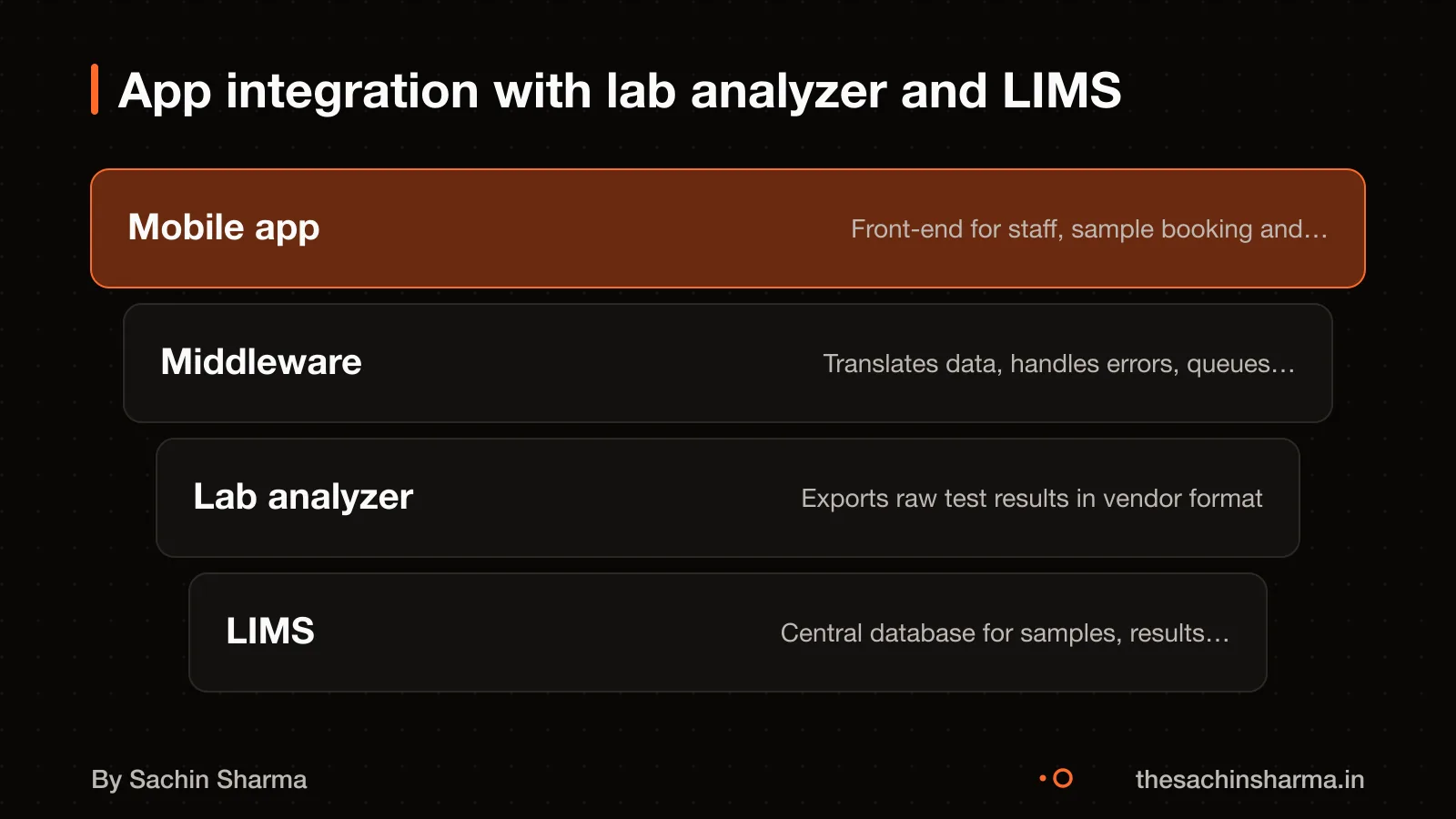
The app may sync with your analyzer depending on the device model. Most analyzers do not connect directly to apps. Instead, a middleware layer like Lab Analyzer Connector routes data securely between devices and your system. This middleware accepts inputs from multiple device types using standard formats like HL7 and sends structured output to your app or LIS/LIMS.
Middleware is needed because lab machines use different firmware versions and vendor-specific message formats. Some may use serial cables, others network connections. Without middleware, you would need custom code for each device, which raises cost and risk. The middleware handles protocol translation, error logging, and message validation so your app receives clean, consistent data.
Even with middleware, custom configuration is often required for specific devices. The developer must test each connection in your lab environment. Local database configuration is needed.
Because every lab has unique hardware and workflows, integration takes extra time and raises cost. You should ask your developer which analyzers they have connected before and whether your models are on their supported list. Do not assume compatibility, verify with your vendor’s technical specs.
Build or buy a diagnostics lab booking app, your integration needs may tip the balance.
How patient data is stored and protected
Your developer must store patient data securely and keep a full audit trail. You must protect all personal data with reasonable security safeguards.
Audit trails are critical. Every record must capture the exact date and time of each action. These logs must be permanent and cannot be deleted or altered. This helps trace errors and ensures accountability if a wrong result is issued.
For technical depth on secure design, see Secure data handling in lab apps.
The 3 key technical decisions a developer must make
A developer building a diagnostics lab app must decide how to version reports. Enforce a digital chain of custody, and ensure traceability across the sample lifecycle. These choices shape the app’s reliability, legal defensibility, and trust with patients. Without them, your lab risks errors, disputes, and non-compliance.
First, report versioning must preserve every prior state. When a result is corrected, say, due to retesting, the system must keep the original report. Mark it as superseded, and log who changed it and why. This prevents confusion and supports audit trails. As in EHR Copilot, which structures psychiatric notes with version history. Your app should treat each lab report as immutable once issued, with updates as new versions, not overwrites.
Second, digital chain of custody is critical to prove integrity. Every action on a sample, from collection to disposal, must be logged with a timestamp, operator ID, and location. This is not just for audits; it defends your lab if a patient questions result accuracy. The digital chain of custody tracks every operation on digital evidence from acquisition to presentation. It uses hashes for integrity, timestamps for dating, digital signatures for authentication, and automated logs for traceability. In practice, this means your app logs not just “result uploaded” but “Dr. Mehta signed report v2 at 14:23:17, hash: a1b2c3”.
Third, traceability must link sample IDs to every device and user. If an analyzer produces abnormal values, you must trace which samples passed through it and whether they were retested. This requires assigning a unique, scannable ID at collection and logging every handoff. Standards like ISO/IEC 27037:2012 and NIST SP 800-86 define protocols for preserving digital evidence, and your app should follow them. For example, when a technician scans a sample into the centrifuge, the app logs the device MAC address and user badge ID.
These decisions are not optional add-ons. They are core to building a system that labs, regulators, and patients can trust.
How EHR Copilot handles structured health data shows how versioning and traceability work in a real health-data tool.
Want to test a developer's systems thinking? Send one line about your lab app. I'll reply with the top 3 questions to ask.
Message me on WhatsAppWho owns the code, and can you switch developers?
Yes, you should own the app you paid for, but only if your contract says so in writing. The custom code, designs and documents made for your lab belong to you once you pay the final amount. As long as the contract includes a 'work for hire' clause. This clause means the developer gives up ownership of what they built for you. Without it, legal ownership may stay with the developer, even after payment.
A developer can keep rights to pre-existing code libraries they bring to the project, general knowledge/techniques, and open-source components. Verbal promises about ownership are not enough, insist on a written agreement that includes IP assignment. Also, check that the contract has a clear termination clause so you can switch developers later if needed.
For example, if a developer builds a sample tracking system for your lab, that system is yours. But if they used a custom dashboard they made for another client, that piece may stay their property unless agreed otherwise.
When you should not build a custom diagnostics lab app
When you should not build a custom diagnostics lab app
A custom app is not worth it if your lab runs fewer than 50 tests a day. At that volume, the setup and maintenance cost may not pay back. Instead, use a white-label solution or a shared lab network platform. These cut your IT burden and let you start fast. For example, some third-party platforms offer booking, sample tracking and result delivery for a monthly fee per test.
If you have no in-house IT support and your budget is under ₹5 lakh, a custom build is likely too risky. The same applies if your workflows are not yet stable or you expect big changes in the next year. In these cases, off-the-shelf tools are safer.
For simple needs like appointment booking and PDF reports, a custom app adds unnecessary cost. Use a white-label solution if you want branded reports and SMS alerts without building from scratch. They are cheaper and quicker to deploy.
Next step: message me on WhatsApp with what you want to build. No forms, no sales team.
Message me on WhatsAppAssumptions behind the numbers
- Middleware like Lab Analyzer Connector is used for integration
- Team location affects data residency and compliance
- Versioned reports are maintained with checksums for integrity
Your checklist
Before hiring, check these 12 points in the proposal. Tick what is covered; the page updates your readiness.
Core Functions
Security & Compliance
Legal & Ownership
Documentation
Walk away if
- No mention of audit trails or specimen tracking
- Does not clarify data encryption method
- STQC or equivalent certification not discussed
- No 'Work for Hire' or IP ownership clause
- Source code access or handover not stated
- Team location or data residency unclear
Questions people ask
01How long does it take to build a diagnostics lab app?
The time to build a diagnostics lab app is not specified in the evidence. The time to build a diagnostics lab app is not specified in the evidence.
02Can a remote developer build this, or do I need someone local?
Whether a local developer is needed is not stated.
03What maintenance does the app need after launch?
Maintenance needs after launch are not described.
04What happens if the app shows a wrong test result?
The app must keep an audit trail of every step so errors can be traced to the source. A formal correction process should update records and notify the patient and doctor. Discuss with your developer how versioning and alerts are built into the system to prevent and fix mistakes.
05How do I test a developer's lab workflow knowledge?
Ask them to explain chain of custody, specimen tracking, and how they would handle retests or sample rejection. Test their knowledge of integration challenges with lab analyzers and version control for test protocols. A strong developer will map your workflow before writing code.
06What skills matter most: Flutter, Node.js, or database design?
The skills most important for this app are not ranked in the evidence. Strong database design ensures audit trails and reliable reporting, which are more critical than front-end or language preferences.
07Should I hire a full-stack or mobile-only developer?
Hire a full-stack developer because lab apps need complex backend systems for data processing, integrations, and compliance. Mobile-only developers may miss server-side logic for result validation, user roles, or analyzer sync. The backend handles the core logic, not just the interface.
08What should I check in a developer's past work?
Look for projects with audit trails, health data handling, or third-party integrations in their portfolio. Ask how they managed data privacy and versioning in past apps. If they have built tools for clinics or labs, review how specimens or records were tracked from start to end.