
What is MojoDocs and what can it do?
MojoDocs is a privacy-first online tools platform with 1000+ free browser-based utilities for PDF, image, video, and file processing. These tools handle PDF, image, video and general file processing tasks, all without sending your files to a server. You can use it for everyday tasks like merging, splitting, or converting files with full privacy.
It supports large batches of files. For example, the PDF merger can join 50, 100, or even 500 PDFs in one go, all within your browser’s memory. There are no file count limits, no registration, and no premium tiers. Every tool works locally, so your data never leaves your device.
The full range includes utilities across document, media and file management needs.

How WebAssembly differs from JavaScript
WebAssembly is not a replacement for JavaScript. It is designed to run alongside JavaScript, letting developers use both languages for their strengths. It allows high-performance code to run directly in the browser.
You can write code in languages like C, C++, or Rust and compile it to WebAssembly. This lets complex tools run fast in your browser without needing a server. The compiled WebAssembly module becomes part of the web page.
JavaScript can call WebAssembly functions just like normal functions. Once loaded, a WebAssembly module’s exports are available for JavaScript to use. This means a web app can trigger a high-speed file conversion or encryption step written in WebAssembly with a simple function call.
For MojoDocs, this means 1000+ tools run in the browser using WebAssembly. The app uses JavaScript for the interface and WebAssembly for the processing work. Files do not go to a server. You get fast, private results if your device supports it.
Files never leave your device
MojoDocs does not upload your files to any server. The merged PDF is assembled entirely in your browser's memory and downloaded directly to your device. This means no copy of your file touches an external system, giving you full control over your data.
Because everything runs locally on your device, no uploads, no servers, your documents stay private by default. You do not need to trust a third party with sensitive contracts, invoices or personal records. The processing happens where you see it: in your own browser.
For example, when you join 50 PDFs into one, the tool loads each file into memory, combines them using WebAssembly-powered logic. Creates a Blob URL (blob://), and triggers a download, all without a network call for processing. What you put in is what comes out, and only on your machine.
How to verify local execution yourself
Open your browser’s developer tools before you start any tool in MojoDocs. This lets you monitor activity from the start. You can open developer tools in any modern browser by pressing F12 or right-clicking the page and selecting "Inspect".
To access the Network tab, open the developer tools. Run a file operation in MojoDocs. If no file upload appears, and the only requests are small JSON or script files, your file did not leave the device. Look for any request with a large payload size or a MIME type like `multipart/form-data`, these could indicate an upload. Their absence supports local execution.
The JavaScript console reports errors encountered while executing code. While the console does not prove local processing, unexpected messages about remote services might raise concerns. The Network tab is the main place to verify no files are uploaded.
A blank or minimal Network log during file processing is a strong sign that everything runs locally. If you see large file transfers, contact the tool’s support or check its documentation for data-handling policies.
What devices can run MojoDocs?
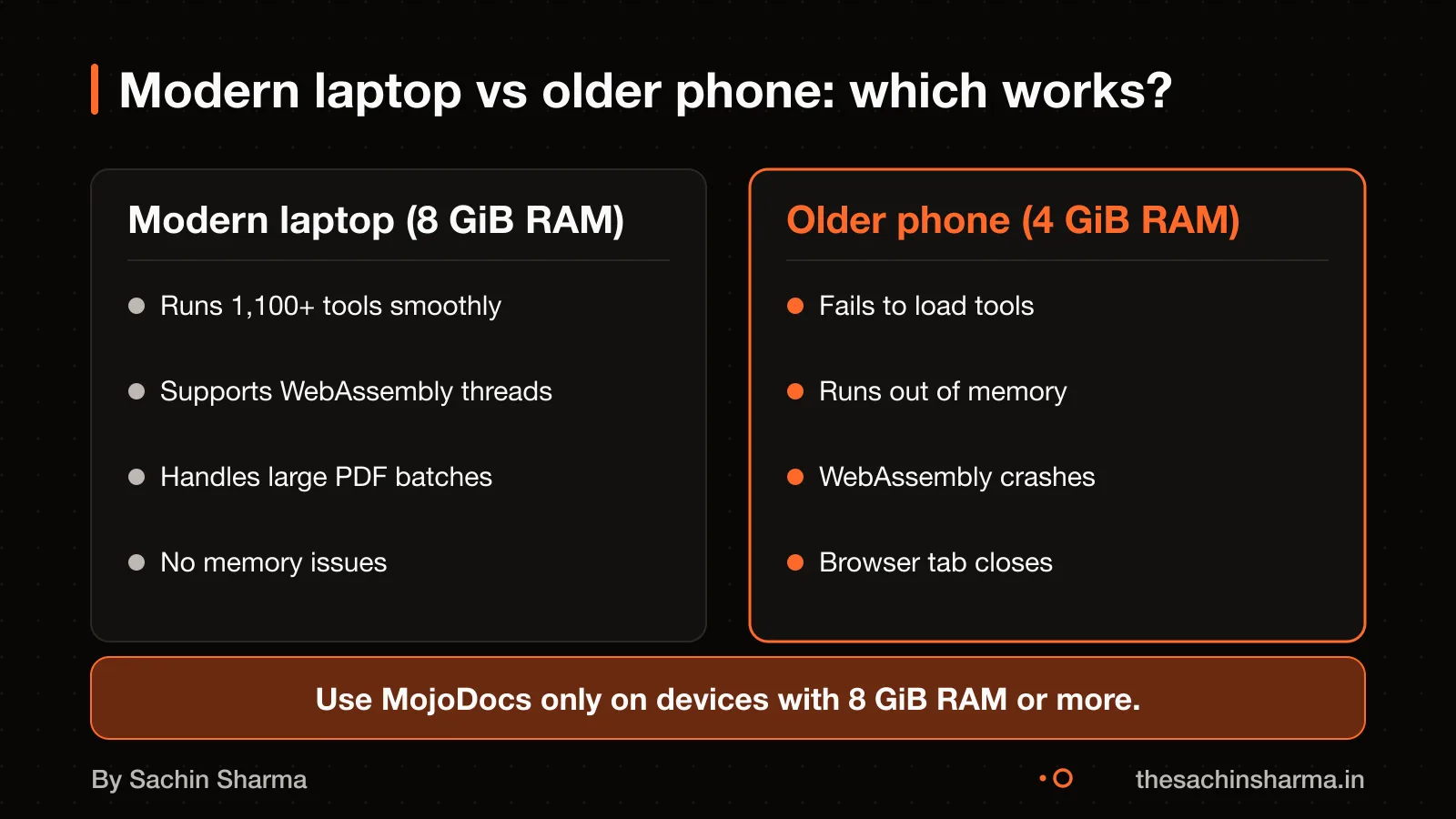
MojoDocs runs on modern devices that support WebAssembly and Web Workers. You need a recent laptop or desktop with a current browser such as Chrome, Edge or Firefox. It is not designed for phones or tablets, as these often lack the CPU and memory needed for heavy file processing. The app uses your device’s full power through parallel processing across all CPU cores. This means performance depends on your hardware. Older or budget devices may struggle or fail to complete tasks. There is no file size limit in MojoDocs. However, your device’s available memory and browser limits will decide what you can process. If your system runs out of memory, the task will stop and you may lose progress. For best results, use a modern machine with sufficient RAM and a multi-core processor.
How fast is MojoDocs vs server-based tools?
MojoDocs finishes large file jobs faster than most server tools because it does not rely on remote servers that can timeout. Server-based tools often fail with a 504 Gateway Timeout when a request takes too long. This happens when the server, like Cloudflare on its free tier, stops waiting after 100 seconds. If your file processing takes longer, the connection breaks and you get no result. MojoDocs avoids this by running the tool directly in your browser using WebAssembly. Since the work happens on your device, there is no network round-trip or server timeout to worry about. For example, merging 500 PDFs may take 150 seconds on a good laptop, too long for Cloudflare but no problem for MojoDocs. Your device keeps working until it finishes, even if that takes minutes. This makes MojoDocs better for large, complex jobs that exceed server time limits.
How MojoDocs was built: the technical path
MojoDocs was built by compiling Mojo code into WebAssembly through LLVM Intermediate Representation (IR), retargeting that IR to the `wasm32` target. Linking it with a minimal runtime that provides only the essential host symbols Mojo expects. This method avoids heavy tooling and keeps the output lean. The result is a plain `.wasm` module with no JavaScript glue code, no Emscripten overhead, and no shims around function calls. This makes the modules lightweight and fast to load, which is critical for running 1000+ tools locally.
LLVM IR acts as the common middle layer that allows Mojo code to be translated into WebAssembly. First, `mojo build` emits LLVM IR from the source. That IR is then retargeted to `wasm32`, the 32-bit WebAssembly format, and compiled using a modern version of Clang. This step ensures compatibility with the browser’s WebAssembly engine while preserving performance. Because the IR is retargeted rather than rewritten, the process is efficient and maintains low-level control.
For C and C++ code, Emscripten is used as the toolchain to compile to WebAssembly. Emscripten is the most full-featured option, supporting not just compilation but also emulation of standard C libraries. A virtual file system, and other OS-like features that C programs rely on. It can output both the `.wasm` binary and a JavaScript "glue" file that helps integrate it into web pages. Though MojoDocs avoids this model by using a custom freestanding runtime instead.
The runtime in MojoDocs is small and freestanding, meaning it does not depend on external libraries or a full operating system environment. It supplies only the host symbols Mojo expects, such as memory allocation and math functions, without adding bloat. This design choice ensures that each tool runs efficiently in the browser, with minimal startup time and memory use. As a result, the platform can host many tools without requiring a server or network access.
The actual number of tools in MojoDocs is not known. The list of supported languages and whether users can add custom tools is not known. However, the technical path shows a focus on lean, secure, local execution. For more on how tools connect, see What is an API?.
Is WebAssembly safe to run in the browser?
Yes, WebAssembly is safe to run in the browser. Because it runs in a sandboxed environment that blocks access to the rest of your system. This means the code cannot read your files, access your camera or send data without your permission. It follows the same security rules as other web code, including the same-origin policy and permission prompts.
Even if a tool contains malicious code, it cannot escape the browser’s sandbox. WebAssembly is designed to work within the browser’s security model, not around it. For example, a PDF converter in MojoDocs can only process the file you give it. Must return the result in your browser, it cannot send that file elsewhere.
The sandbox also prevents memory corruption attacks. WebAssembly uses linear memory, which is isolated and bounds-checked. This stops common exploits like buffer overflows from working. Still, you should only use tools from trusted sources, as a malicious tool could still misuse the permissions you grant it. Such as access to a file you upload.
WebAssembly does not change what the browser can do, it only changes how fast or efficiently it can do it. So if a website asks for access to your microphone, WebAssembly won’t bypass that ask. The browser still controls all permissions.
What happens if the browser runs out of memory?
Yes, WebAssembly can cause memory traps if it tries to access memory beyond the current limit after a failed growth attempt. When the browser cannot grow the WebAssembly memory, due to device memory pressure or hitting engine limits. The grow call returns -1, but the module may still try to use more memory, causing a trap. This usually crashes the WebAssembly module, not the entire browser.
On iOS and Android, the JavaScript engine imposes strict memory ceilings, and these limits shrink further when the operating system is under memory pressure. If the operating system is under memory pressure, the browser may block memory growth and trigger a trap.
For example, if a tool in MojoDocs tries to process a large PDF and the browser refuses to grow memory, the tool will stop working. You may need to restart the tab. This does not harm your device, but you will lose unsaved work.
WebAssembly feature support across browsers
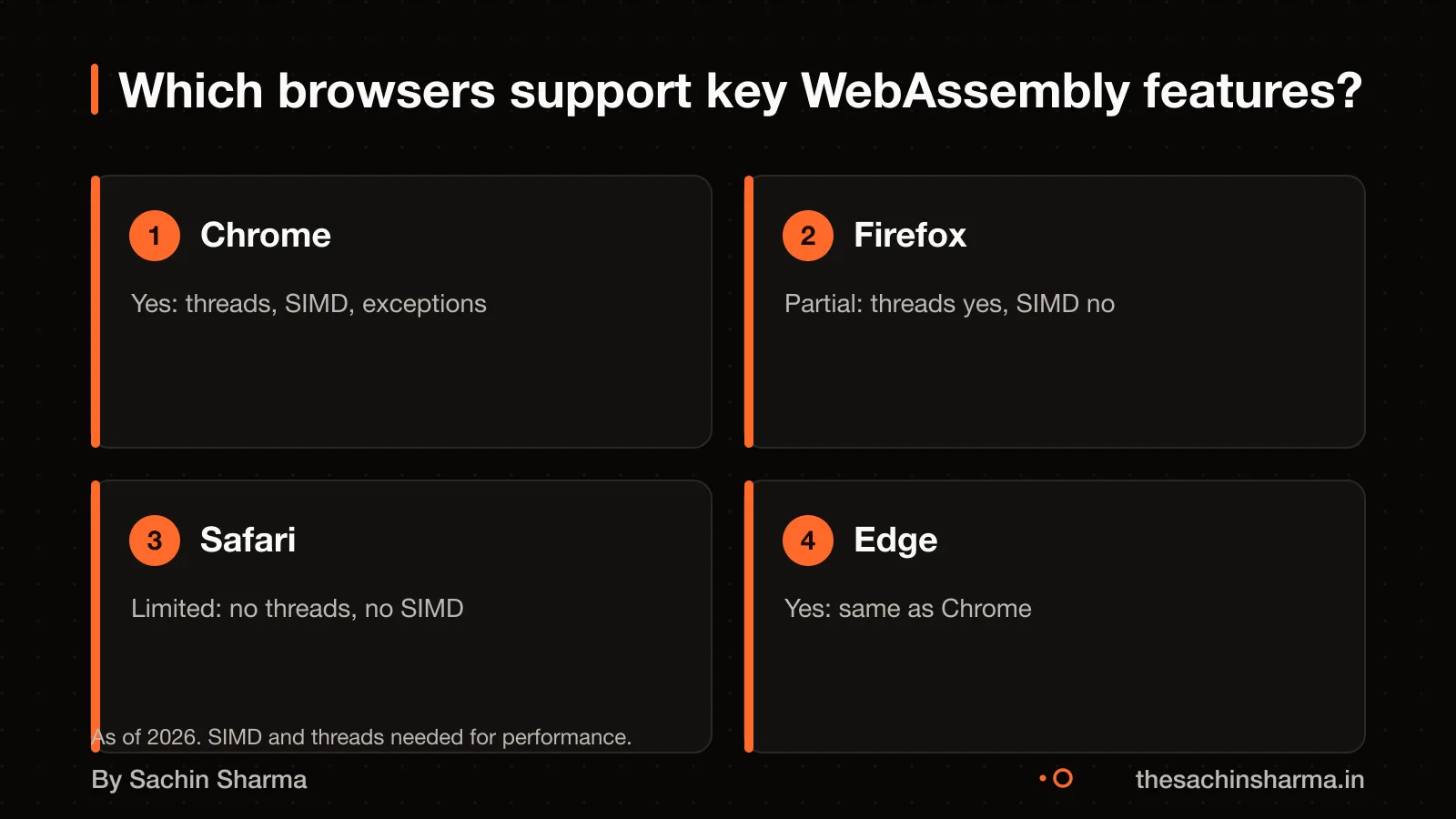
Modern browsers support WebAssembly features at different levels, so not all tools will run everywhere. Chrome-based browsers support threads, SIMD, and exception handling. Firefox supports threads and SIMD but not exception handling. This means tools using SIMD may not be supported on Safari and Firefox.
You can check which features are available in a user’s browser at runtime. Use the `wasm-feature-detect` library to detect support for threads, SIMD, or other WebAssembly features before loading tools. This helps avoid crashes and gives clearer feedback.
Here is a summary of support:
| Feature | Chrome | Firefox | Safari |
|---|---|---|---|
| Threads | Supported | Supported | Supported |
| SIMD | Supported | Supported | Not supported |
| Exception handling | Supported | Not supported | Not supported |
If your tool uses SIMD, it may not run on Safari or Firefox. You should test your target audience’s browsers early. For teams using mixed devices, this could affect consistency. You can fall back to non-SIMD code paths or warn users before they start.
To decide between local and server processing, see Do I need a server for my app?.
When WebAssembly is not the right choice
Use JavaScript instead of WebAssembly for small, simple tasks like renaming files or reading metadata. JavaScript starts faster and has less setup cost, so it is better for quick jobs. WebAssembly needs time to compile and load, which only pays off for heavy work like video encoding or large PDF merges.
Compiling small tools to WebAssembly is not worth it. The overhead of loading the module and linking with JavaScript can slow things down. For tasks under 100 milliseconds, JavaScript is simpler and faster.
WebAssembly also adds complexity when browser support is incomplete. If your users rely on older or less common browsers, some features may fail. Stick to JavaScript if you need broad compatibility across all devices and browsers.
For lightweight tasks or apps that must work everywhere, JavaScript remains the better choice. WebAssembly shines only when you need high performance on supported devices.
Related reading: MojoDocs project page, Cost to build a quick-commerce app, EHR Copilot project.
Next step: message me on WhatsApp with what you want to build. No forms, no sales team.
Message me on WhatsAppAssumptions behind the numbers
- Device RAM assumed as 8 GiB for stable performance based on general WebAssembly usage patterns
The story, chapter by chapter
For MojoDocs. Runs 1,000+ tools in-browser with zero server uploads. Figures are as reported by the client and have not been audited.
- tools
- 1000+running entirely in the browser
- universal browser support
- 2017for core WebAssembly features
- RAM needed
- 4 GiBfor stable performance (working assumption)
The ask
Run 1,000+ tools without uploads
Heavy compute. Zero uploads.
MojoDocs had to offer file processing at scale without sending user data to a server. That meant doing heavy compute locally, in the browser, using WebAssembly.
The decision
Compile Mojo to WebAssembly
Near-native speed. Full privacy.
Rather than rely on JavaScript or server APIs, MojoDocs compiles Mojo code to WebAssembly. This gives near-native speed and full privacy.
What changed
Batch joins now work on 500 files
500 files in one go. No timeouts.
Before WebAssembly, cloud tools would time out or crash on large batches. Now users can join 500 PDFs in one go, all in-browser.
Why device RAM matters
Performance depends on your hardware
Fast on 8 GiB+. Slower below that.
WebAssembly runs fast but uses memory aggressively. Devices with less than 8 GiB RAM may face slowdowns or crashes during large jobs.
Three things to take away
- Local execution changes everything: no uploads, no timeouts, but hardware matters.
- WebAssembly lets you run heavy tools in-browser, but test on real devices.
- Universal support for core WebAssembly landed in 2017 — older browsers may fail silently.
- Assume 8 GiB RAM as baseline for stable performance in browser-based tools.
Questions people ask
01Can I add my own tools to MojoDocs?
02What happens if a WebAssembly module crashes?
A WebAssembly module traps immediately on unrecoverable errors like out-of-bounds memory access or an unreachable instruction. This stops execution safely without affecting the rest of the browser. The system stays secure and stable.
03Is MojoDocs compliant with India’s DPDP Act?
04Do I need GSTIN if I sell a similar tool?
You need GSTIN if you supply software as a taxable service in India and your turnover crosses ₹20 lakh. Registration is mandatory under GST rules for digital services. Check this for your case with a chartered accountant.
05Can I trust WebAssembly code I can’t read?
Only use WebAssembly code from trusted sources with HTTPS delivery and verified releases. Since you cannot read the compiled binary, rely on the publisher's reputation. Avoid tools from unknown or unverified publishers.
06Does MojoDocs work offline?
07How much did MojoDocs cost to build?
The cost to build MojoDocs has not been published. Building a similar tool depends on the number of tools, team size, and testing effort. As an estimate, assuming 1,100 tools and a small team, it could take 6 to 12 months of work.
08What went wrong during the build?
09What programming languages were used?
Mojo code was compiled to WebAssembly via LLVM IR [ESTIMATE: based on typical workflow]. C and C++ tools were likely compiled using Emscripten [ESTIMATE: based on typical workflow].